
Read the Today dashboard
Today is your home screen (Home → Today). It answers “what needs me right now?” before you open anything else, in three bands: the work waiting on you, the day’s movements, then quiet signals that only describe the day. Almost everything on it is a link to the exact rows behind it.
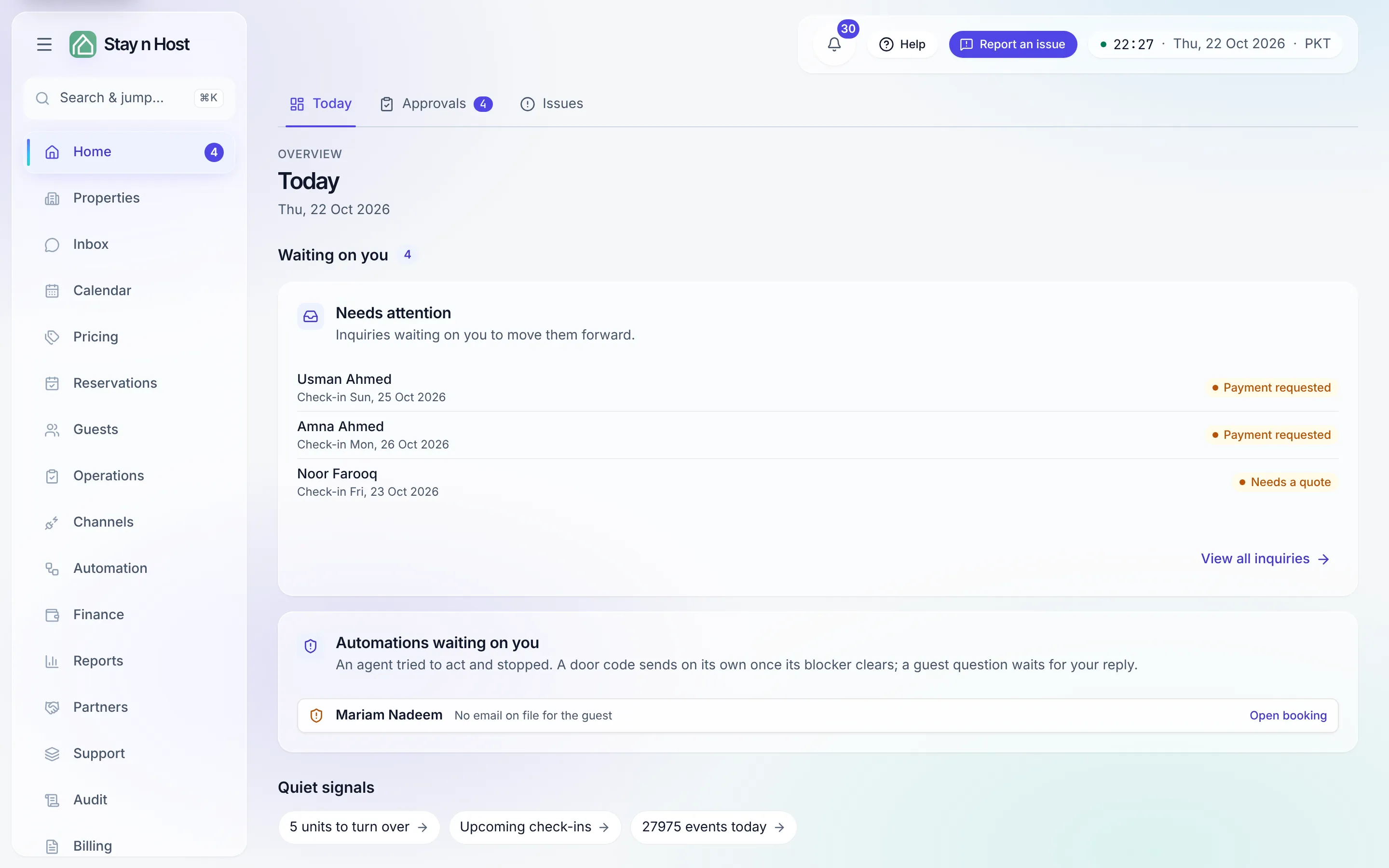
“Today” means your workspace’s own calendar date, not the server’s - a board read at 11 pm and one read at 1 am count different days.
A new workspace: the setup checklist
Section titled “A new workspace: the setup checklist”A brand-new workspace shows Finish setting up your workspace above everything else. Required steps are what a booking needs: add your first property, add a unit you can sell, set a nightly rate for your units, add photos guests will see, and add the bank details your quotations print. Optional polish beneath them (invite a teammate, publish your booking site, turn on the guest app, connect Airbnb, add a price rule) is worth doing but never keeps the checklist open. Each step’s Set up button opens the page that does it. The checklist disappears once every required step is done; Feature status shows the rest.
Waiting on you
Section titled “Waiting on you”The first band carries a count of everything in it. (The badge on the Home row in the rail is different: it counts approvals waiting on Home → Approvals.) Each card appears only when your seat can act on it:
- Needs attention - inquiries waiting on a person, most urgent first: Verify payment, Payment requested, Needs a quote, and Unit freed (a waitlisted guest whose unit came free). Clear the Needs-attention queue walks through each kind.
- Codes ready to relay - guest door codes that have cleared the payment-and-ID gate, shown only to the Point of Contact seat that hands them over. Reveal opens the booking to hand one over.
- Automations waiting on you - an automation tried to act and stopped (for example, “Payment not verified yet” or “ID not verified yet”). A door code sends on its own once its blocker clears - no second button to press. A guest question the AI would not answer waits here too, with Open conversation.
- Extras guests asked for - extras a guest requested in the guest app. Confirm to add them to the booking’s payment history, or decline with a reason; Open payment history takes you there.
The Needs-attention card has three empty states worth recognizing:
- All clear - the funnel is working and nothing is waiting on you.
- Nothing for your seat - work exists, but it needs a role you do not hold.
- Nothing to work yet - a new workspace; finish the setup steps above and inquiries will land here.
Today’s movements
Section titled “Today’s movements”This band appears when you can check guests in or out and something is due. Its summary reads like “3 arriving · 2 leaving today”, plus how many are overdue.
- Arrivals and Departures list every guest due in or out today, each with a one-tap Check in or Check out button and an amber “amount due” chip when money is still owed.
- Check several in at once. Tick the arrivals who are standing in front of you (or Select all arrivals) and press Check in selected. Each guest is checked in exactly as if you had done them one at a time; if one cannot be, the others still go through and you are told which and why.
- Overdue check-ins - stays whose check-in day passed in the last 30 days and were never checked in. A stay that is already over offers Check in & out, which records both on the booking’s own dates.
- Overdue check-outs - guests checked in whose check-out day passed in the last 30 days. See all opens the full list.
Step by step, with the confirm dialogs: Check a guest in or out from Today.
Quiet signals
Section titled “Quiet signals”Short counts that describe the day rather than ask for a hand. Each one opens the page behind it, already filtered:
- Units to turn over - units waiting for or in cleaning (opens Housekeeping).
- Cleans missing photos - cleans in the last 30 days that have no before or after photo or video. It opens the Housekeeping board filtered to exactly those cleans.
- Properties without a guest app - their booking confirmations go out without the app button.
- Upcoming check-ins - the next confirmed arrivals.
- Events today - today’s activity, for seats that can read the audit trail.
When nothing applies, it says “Nothing else to report today.”
Show the details opens the full cards behind those counts:
- Turnovers - where every unit sits between checkout and ready: awaiting dispatch, in cleaning, awaiting inspection, urgent same-day turnovers, open damage, and missing photos / videos (30 days). Open housekeeping jumps to the queue.
- Guests here get no app link - the properties with no live guest app, and why (never set up, or set up but switched off).
- Upcoming check-ins - the next confirmed arrivals across your listings.
- Activity today - what happened in your workspace today, newest first, with View full activity opening the audit trail.