
Read the audit trail
Every state change in the workspace - a verified payment, a role change, a released code - writes an audit row as it happens. Audit is where you read them, and it is the first stop when something surprising happened: the answer is always recorded.
The table
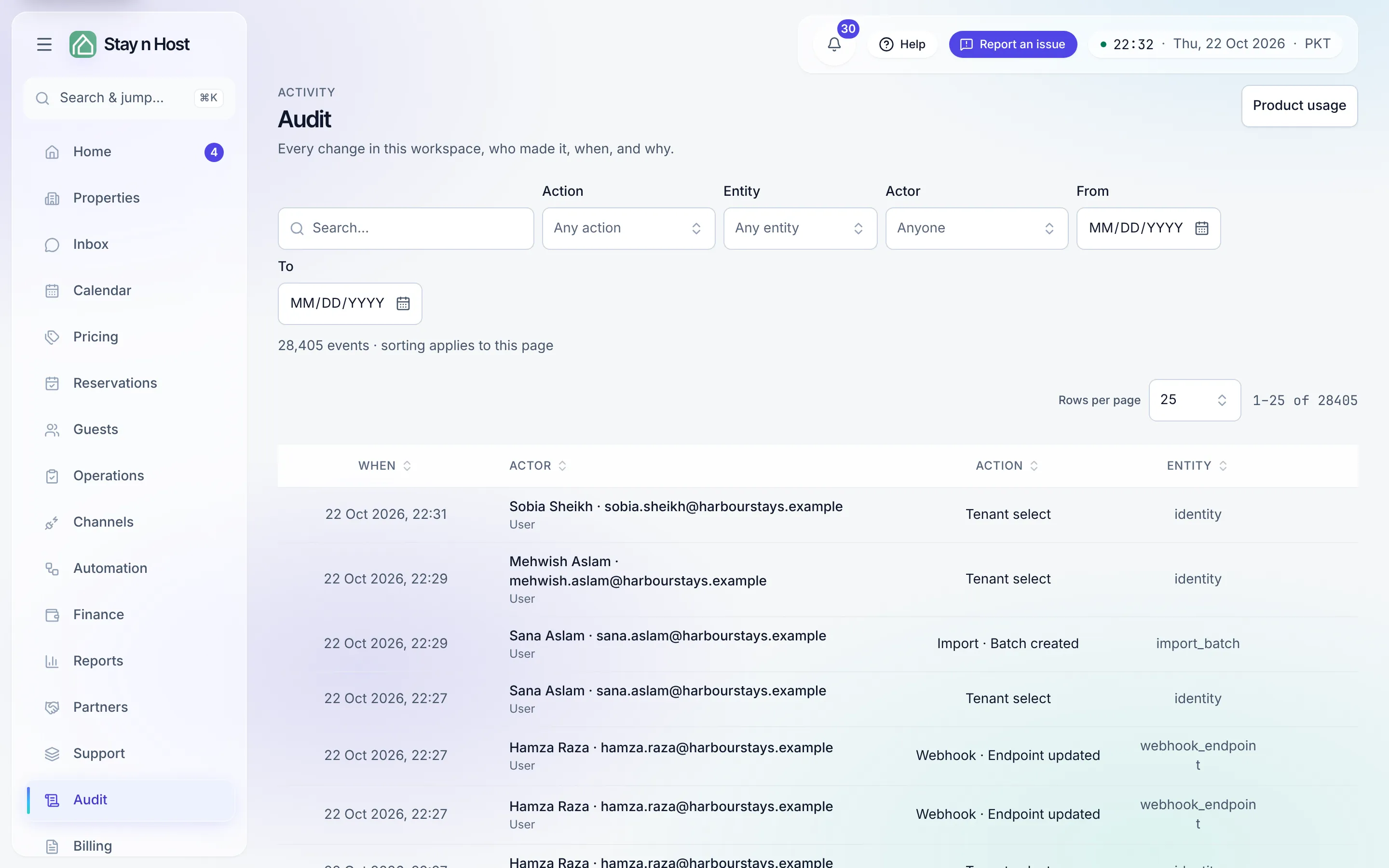
Section titled “The table”Four columns - When · Actor · Action · Entity - with rows per page and pages to step through. The count above the table says how many events there are (or how many match your filters). Sorting a column sorts the page you are looking at.
Click Details on any row for the whole event:
- Who - the person by name, with their actor type.
- What - the action, in words.
- The record it touched, by name - the booking, the listing, the photo’s unit, never a bare id.
- The field changes - what the value was and what it became, with money in your workspace’s currency.
- Page - the screen the action was taken on (its address, without any query). An automation has no page, so its rows show none.
- IP address and Browser / client.
Copy event puts that same trimmed view on your clipboard for a support ticket.
Filter the whole trail
Section titled “Filter the whole trail”The filters search the entire trail, not just the latest page, and every filter you set goes into the page address, so a filtered view can be bookmarked or sent to a colleague.
| Filter | Narrows to |
|---|---|
| Search the trail | Events whose action, record type, actor, page, or recorded reason contains what you type |
| Action (Any action) | One kind of action, picked from the actions this workspace has recorded |
| Entity (Any entity) | One kind of record - bookings, members, properties and so on |
| Actor (Anyone) | One person (or automation) |
| From / To | A date range |
Changing any filter returns you to page 1. Clear filters resets them all.
Reading an actor
Section titled “Reading an actor”On Audit, the Actor column shows who acted, with the actor type underneath:
- A person shows by name and address, with the type User.
- An automation shows the rule that acted - an agent rule, a sweep, a scheduled job, or a workspace setting such as Inspection after cleaning - with the type System. “Who sent that?” has an answer even when the answer is “the rule you configured.”
- An API key shows as the key’s prefix, so an integration’s change is never mistaken for a person’s. See API keys.
The history shown on each record (a booking’s History tab, a verification’s trail, a turnover’s trail, a guest’s flag history) follows one rule for the same rows: a person by name, automation (the rule) for a rule, and the guest, via the quotation link for something a guest did on their quotation link - so a rule is never mistaken for a colleague.
Product usage: which screens your workspace uses
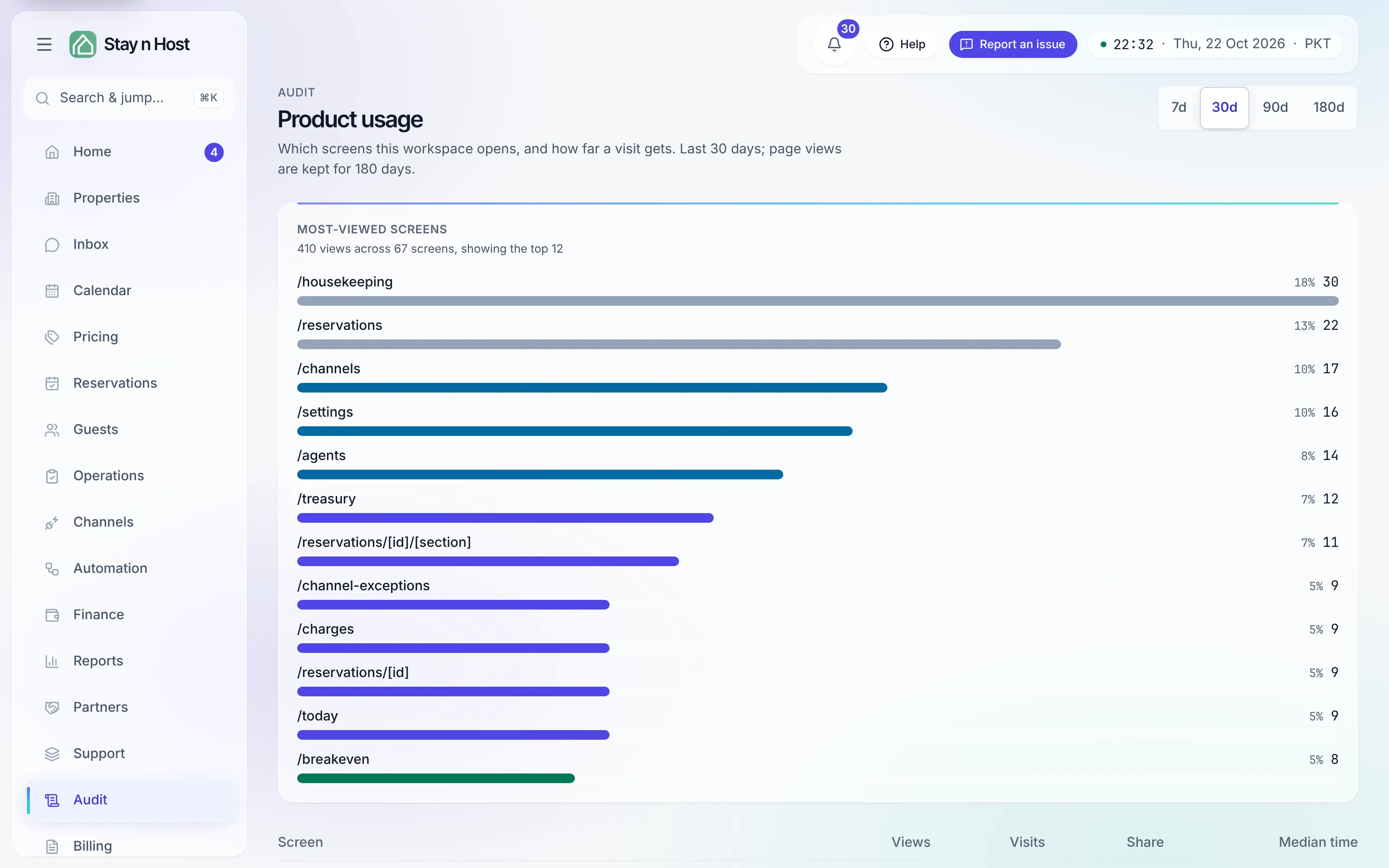
Section titled “Product usage: which screens your workspace uses”Product usage (the link at the top of Audit, /audit/usage)
answers a different question: which screens does this workspace actually open, and how far
does a visit get? It is for spotting the pages nobody uses and the ones everyone lives in.
- Window - the last 7, 30, 90 or 180 days (30 by default). Page views are kept for 180 days.
- Most-viewed screens - each screen’s Views, Visits, Share of all views, and Median time spent on it.
- How far a visit gets - how many visits opened one page, reached two, three and more, and where visits left. A visit is one browser tab.
Views arrive in batches, so a brand-new workspace may need a few minutes of use before anything shows. It shows screens and counts, never who looked at what: that is what the trail itself is for.
What’s next
Section titled “What’s next”- Approval decisions land here with their notes - Require an approval step.
- Wondering why an actor could do something at all? The grants are on Choose the right role and in Reference.