
Read the Treasury
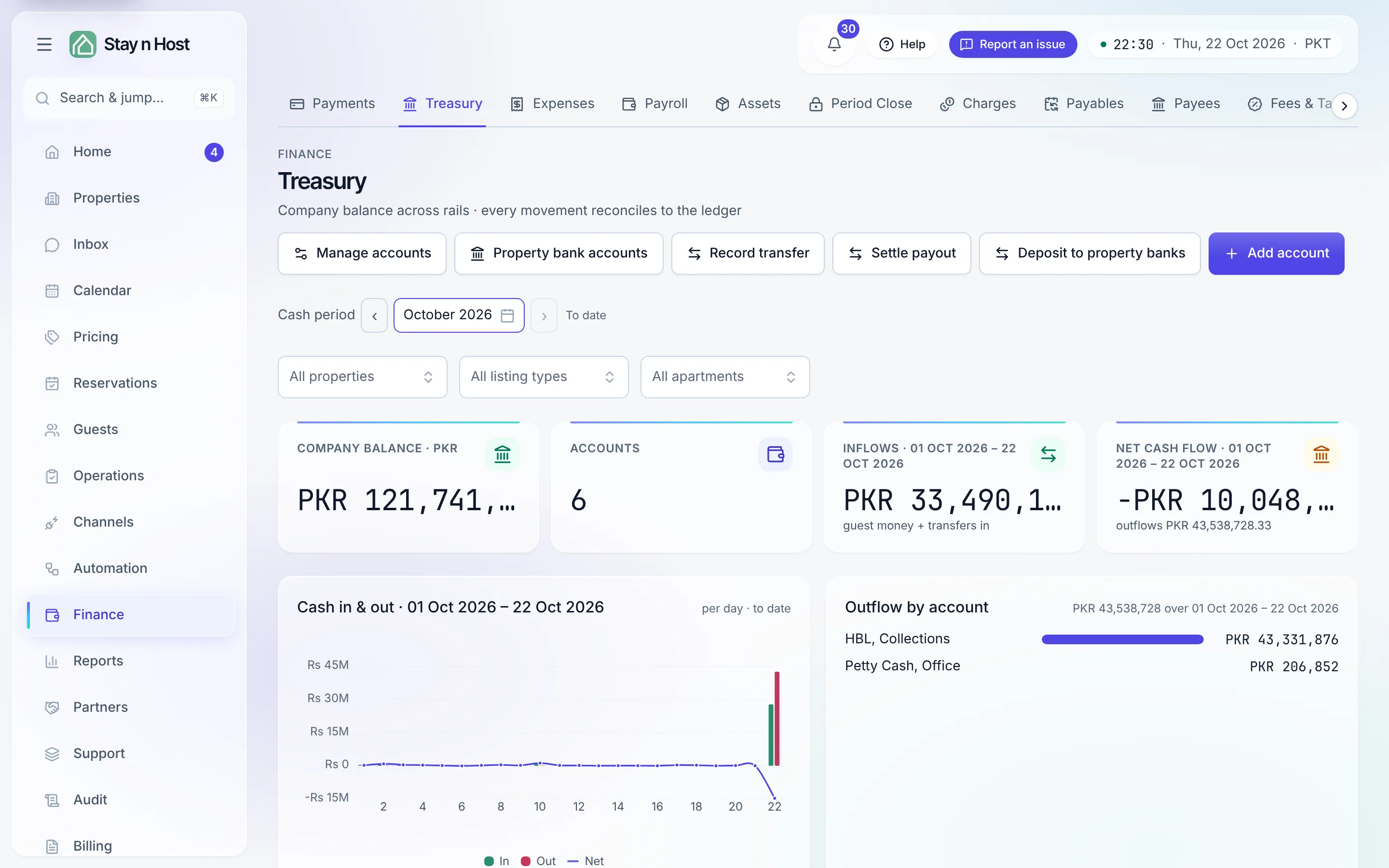
Treasury is where your money actually sits: every bank account, wallet, and cash drawer, with the company balance across all of them and the ledger of every movement. You never post an entry here - verified payments, expenses, transfers, and payouts post themselves, double-entry underneath - you read the result. Open it from Finance -> Treasury.
The balance tiles
Section titled “The balance tiles”At the top: one Company balance tile per currency (balances are never summed across currencies), an Accounts count, and Inflows / Net cash flow for the picked period. Balances are as-at-now - a bank balance isn’t a period figure - which is why the Cash period picker sits below them and moves everything else: the flow tiles, the charts, and the ledger at the bottom all describe the same window (default: this month to date).
Narrow it to a property or an apartment
Section titled “Narrow it to a property or an apartment”Beside the Cash period picker sit the same three filters as the P&L: All properties, All listing types and All apartments. Pick one and the flow tiles, the charts and the ledger narrow to the money that touches that part of your estate. When a filter is on, the page says two things, and both matter:
- The balances do not narrow. The company balance tiles and the account cards stay the whole workspace’s, because a bank balance is one pot of cash that no apartment owns a slice of. That is why the filters sit below the balances, not above them.
- A movement counts in full under every apartment it touches. One payment that settles three apartments shows its whole amount under each of them, because a movement shown as a fraction of itself could never be matched to a bank statement. For what one apartment earned, use Property Reports instead.
Accounts
Section titled “Accounts”Each card is one money store - its name, type (Bank, Easypaisa, JazzCash, Cash in hand, Raast), GL code, and live balance. Add account (Admin) creates one; the type list offers only the payment channels you’ve switched on under Setup -> Settings -> Payment channels. An opening balance posts to the ledger against owner equity, so the books stay balanced from day one. (An account in another currency opens empty and fills from real movements: an opening balance would need an exchange rate the books will not guess.)
Manage accounts holds the settlement details behind your accounts - what a guest is told to pay into - and Property bank accounts decides which bank each property’s guests pay. See Manage bank accounts.
Record transfer moves money between your own accounts - bank to cash, wallet to bank. It’s a balance-neutral posting that never touches profit, and it needs the money-ops capability (Account Manager), not just read access. Between two accounts in different currencies it becomes a conversion: enter the amount your bank actually credited, and the rate is worked out from it.
The transaction ledger
Section titled “The transaction ledger”Every row is a cash movement derived from the double-entry ledger. Filter by kind (All · In · Out · Transfer), by journal book, by account, or search the memo, the booking reference, the guest’s name and the source. Sort any column; the table paginates. Export downloads the rows your filters leave as CSV, Excel or PDF.
The Memo column names the booking behind the money and the guest it belongs to: a payment or refund shows that booking’s reference code followed by the guest’s name, and a group settlement - one payment covering several stays - shows every leg’s code, listing the first three and counting the rest. A group is usually one guest taking several apartments, so the name appears once however many legs the payment covers; a settlement that really is several people’s names the first two and counts the rest. A booking with no guest on record - an imported stay, where the channel never sends a name - still shows its code. Money that isn’t a booking’s, such as an expense or a transfer, shows the memo alone.
Click a row to open what it’s about:
- Money in - a booking payment or refund opens that booking’s Payments tab (with the proof screenshots); a group payment covering several stays opens Payments.
- Money out - an expense opens that expense’s own record, and a bill settlement opens the cost the bill was for, with its receipts and history. Payroll opens Payroll, an owner distribution Owner Payouts, an investor payout Investors, a channel payout Channels, and an asset purchase Assets.
- Treasury’s own rows - transfers, currency conversions, restatements and opening balances - open nothing: this page is their detail.
A row whose page your seat cannot open is not clickable, rather than leading to a page that refuses you.
The charts
Section titled “The charts”All three follow the Cash period you picked.
- Cash in & out - inflow and outflow bars with the net line over them, per day for a short window and per month for a long one. When the window runs to today, the caption says “to date” - don’t read the last column as a slump.
- Cash flow - net per day.
- Outflow by account - where the money left from, over the same window.
What’s next
Section titled “What’s next”- Month end: Close a month.
- Profit rather than cash: Read your P&L.
- Hand the books to your accountant: Share the books with your accountant.