
Get help from support
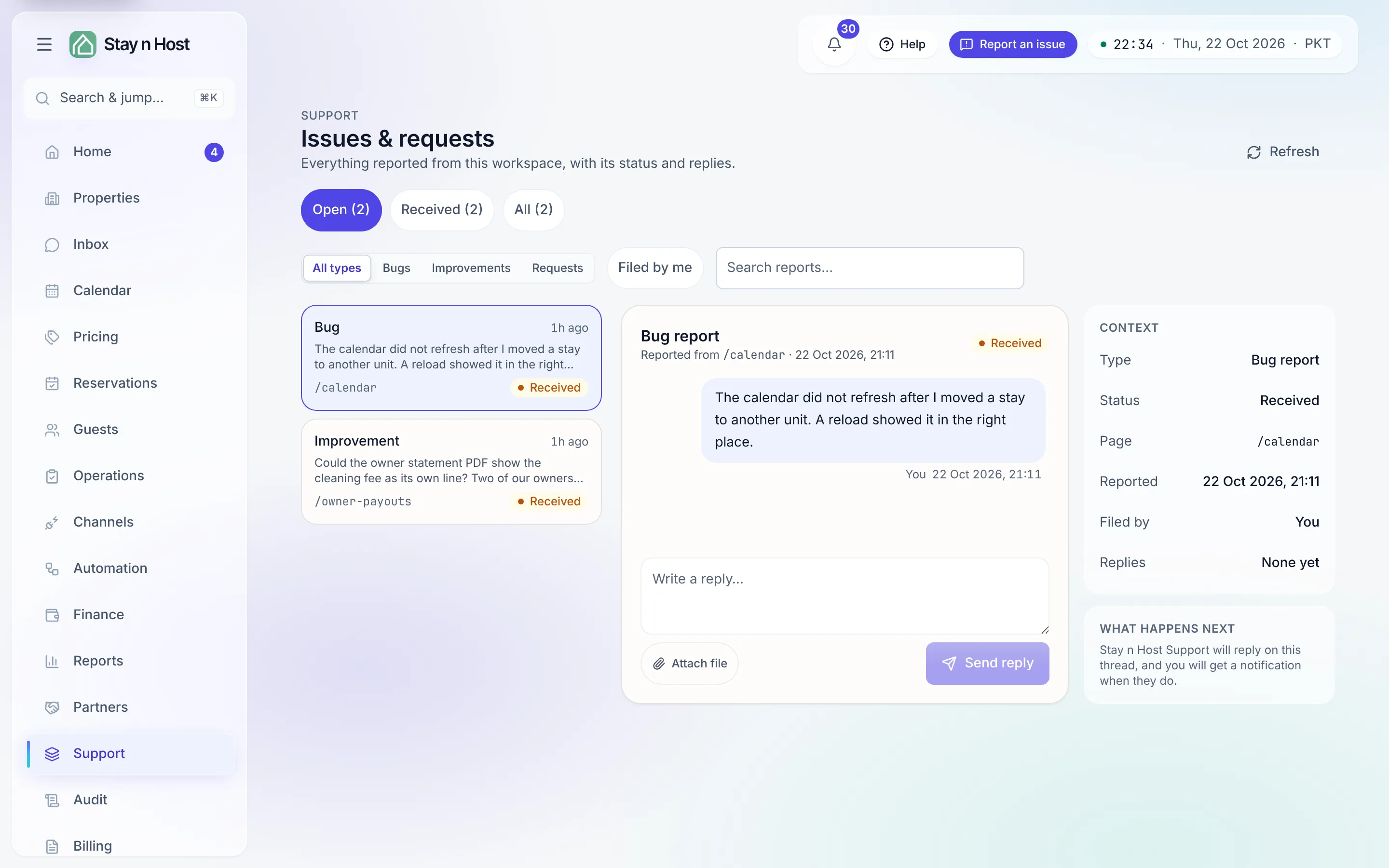
Support is where everything your workspace has reported to Stay n Host lives: bug reports, suggestions, and agent requests, each with its status and a conversation with our team. Every seat has it, including owner and investor portal seats.
Open it from the Support row in the rail, or from Help → Contact support in the top bar.
Report something new
Section titled “Report something new”New reports start from Report an issue in the top bar, on the page where the problem happened: pick Something is broken or A suggestion, describe it, and press Send report. A screenshot of the page and where you were are attached for you. Step by step: Take the guided tour and get help. Requests for a new automation come from the Agent Hub’s Request an agent and land here too - see Request an agent.
The list
Section titled “The list”The left side lists reports, with the most recent activity first. Narrow it with:
- Open (the default) - everything not yet finished, with its count.
- A status chip for each status that has reports in it, or All.
- The type filter - All types, Bugs, Improvements, or Requests (agent requests).
- Filed by me - only the reports you filed.
- Search reports… - matches the start of each report’s text, the page it came from, and its type.
Each row shows the type, the status, the page it was reported from, a preview, and how many replies it has. Refresh reloads the list.
A thread
Section titled “A thread”Pick a report to open it on the right, at its newest message. You see the original report, its screenshot and attachments, and every reply since, from you, your colleagues and the Stay n Host team.
- Write a reply… and press Send reply.
- Attach file adds images or PDFs to your reply, up to six per reply. A picture opens full size when you click it; a PDF opens as a PDF.
- The Context panel shows the Type, Status, Page it came from, who it was Filed by, and the number of Replies, plus What happens next.
What the statuses mean
Section titled “What the statuses mean”| Status | Meaning |
|---|---|
| Received | It reached us; nobody has looked yet. |
| Triaged, Reviewing, Planned | We have looked at it and are deciding or scheduling. |
| In progress | Someone is working on it. |
| Waiting on you | We need your reply before this moves again. |
| Shipped | The fix or change is live. |
| Closed | Finished. Replying on a closed thread reopens it. |
| Not planned | We decided not to do it; the thread usually says why. |
While a report is open, our team replies on the thread and you get a notification when they do.
Need something account-level?
Section titled “Need something account-level?”Use a support thread for things only we can do: a currency conversion after your base currency has locked, a custom role, or closing your workspace. See Account security and your data.