
Read the daily ops report
Every midnight (your workspace’s local business time), the app writes a daily operations report and emails it out. The Daily Report page keeps every past report - what was emailed is exactly what renders, byte for byte - so the day’s plan is always one click away even if the email went astray.
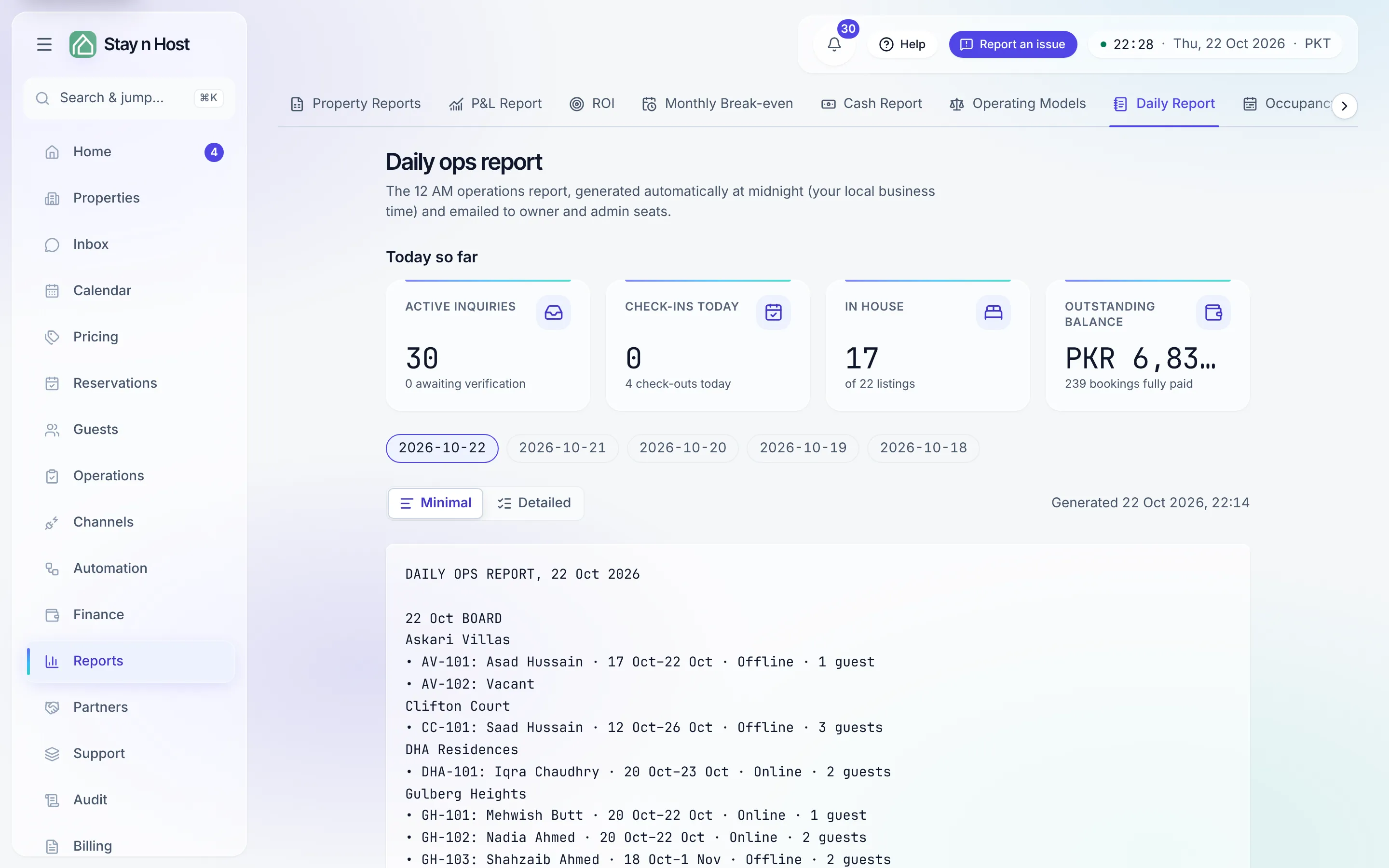
Open it from Reports → Daily Report.
Today so far: the day’s live figures
Section titled “Today so far: the day’s live figures”Above the stored reports, Today so far shows four live tiles. They used to sit on Home; they moved here so Home could stay a queue.
| Tile | What it counts | Where it links |
|---|---|---|
| Active inquiries | Inquiries still in play, with how many are awaiting verification | The Inquiries tab of Reservations, filtered to active |
| Check-ins today | Arrivals due today, with today’s check-outs beneath | Today’s check-ins |
| In house | Guests actually checked in right now (not just “arriving today”), out of your total listings | In-house bookings |
| Outstanding balance | Money still owed on current and upcoming stays, with the count of fully paid bookings | Bookings with an outstanding balance |
These figures are read live each time you open the page, in your workspace’s own “today”. A tile your role cannot see shows a dash, not a zero.
Two versions of the same day
Section titled “Two versions of the same day”A date rail across the top picks the day; a toggle switches between the two variants:
- Minimal - the short brief: the day’s board per unit, today’s check-outs, the cleaning queue, pending payments to clear before check-in, which units are vacant tonight, and the duty & on-call roster.
- Detailed - every section with a live data source: arrivals, departures, same-day turnovers (urgent), in-house guests, vacant tonight, available for sale tonight, pending payments, pending payment verification, pending ID verification, pending smart-lock codes, cleaning required, inspection pending, damage follow-ups, tomorrow’s arrivals preview, and the duty roster.
An empty section prints “None” rather than disappearing - you should see the absence, not wonder whether the section was dropped.
The delivery record
Section titled “The delivery record”Under the report, one pill per recipient shows the variant, the channel, and the status: Queued, Sent, Delivered, Failed, Bounced, or Opted out. Click any pill for the detail dialog - including, for a failed or bounced delivery, the provider’s error message verbatim. A bounced address usually needs fixing on the seat, under Setup → Team.
Where it is configured
Section titled “Where it is configured”The report is an agent rule on the Agent Hub (Automation → Agent Hub, /agents). Its card controls:
- Status - On or Off.
- Which version to email - Short brief, Full detail, or both. WhatsApp always sends the short summary.
- Who receives it - a per-seat list, saved as you change it. The email toggle needs the report-configuration permission; linking a seat’s WhatsApp number is a separate permission, and WhatsApp delivery also depends on the WhatsApp Business credentials being configured.
What’s next
Section titled “What’s next”- Automation - the Agent Hub and its other rules
- Stay on top of notifications