
Build a custom report
The Report Builder answers the questions the fixed reports do not: pick a data set, choose a period, then either list the rows or group them into a summary. Open it from Reports -> Report Builder. Every report lives in its link, so a report you build is a report you can send - and a report over a named period (“Last month”) re-reads itself every time the link is opened.
The data sets
Section titled “The data sets”There are 24 (sorted by topic here; the Data set picker lists them by name), and you only see the ones your seat can already read:
- Stays and guests - Bookings, Booked nights, Enquiries, Guests, Guest messages, Guest reviews.
- Money - Payments, Expenses, Payables, Charges & fines, Channel payouts, Ledger postings, Guest tax.
- Owners - Owner payouts, Owner statement lines.
- Portfolio - Properties, Units.
- Operations - Housekeeping, Inspections, Damage reports, Damage claims.
- Oversight - Approvals, Audit trail, Automation runs.
Start from a ready-made report
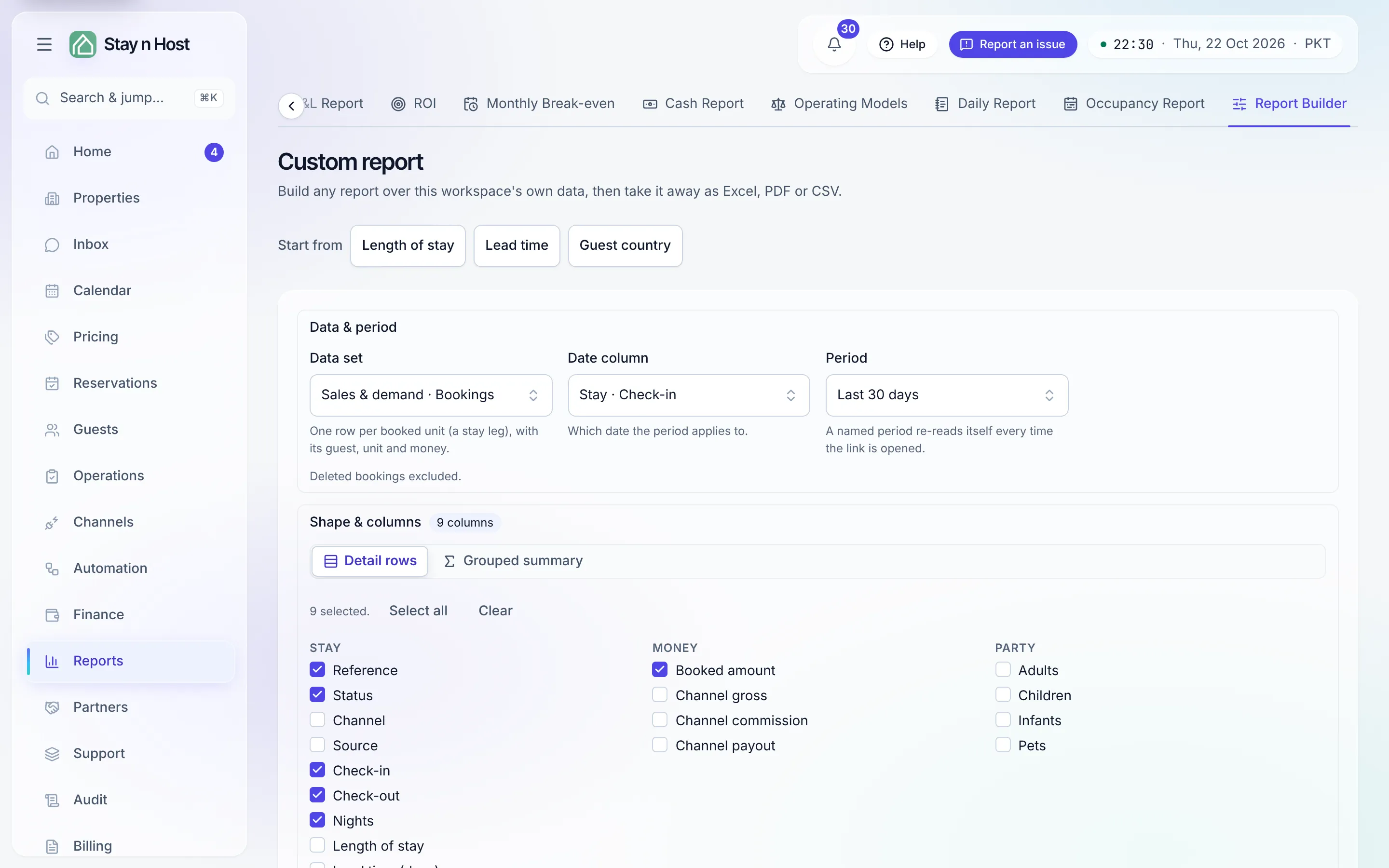
Section titled “Start from a ready-made report”Above the controls, Start from opens a finished report you can then adjust:
- Length of stay - bookings grouped by nights stayed (1 night, 2-3, 4-7, 8-14, 15-28, 29 or more), with the count and the nights in each.
- Lead time - bookings grouped by how far ahead they were made (0-1 days, 2-7, 8-30, 31-90, 91 or more), with the count and the average lead time.
- Guest country - bookings grouped by the guest’s nationality.
Each covers bookings checking in over the last year; change the period, add a filter, or regroup it, then Run report.
Build your own
Section titled “Build your own”- Data & period - pick the Data set, the Date column the period applies to, and a Period: a named one (Today, Last 7 days, This month, Last quarter, Year to date and more) or your own From and To.
- Shape & columns - Detail rows lists every matching row (tick Collapse identical rows to fold repeats); Grouped summary groups by the columns you pick and adds Measures: a count, a distinct count, a sum, an average, a median, a minimum or a maximum, each optionally with a % of total column.
- Filters - add conditions in groups that match all or any of them, or invert a group to exclude what it matches. Filter on a calculated figure keeps only the groups whose measure passes (money is compared in your workspace currency).
- Order & size - sort by one or more columns, set Rows per page, and use Skip rows to page through a report longer than one run.
- Run report.
Money is never added across two currencies: when a report holds more than one, it is grouped by currency as well, so every total is a total of one.
Lead time and length of stay
Section titled “Lead time and length of stay”The Bookings data set carries Lead time (days): the whole days from the day the booking was made to its check-in. Use it as a column, a filter (“lead time at least 30”), or a measure, or group by Lead time band.
- The booking day is your workspace’s own calendar day, in its time zone, not UTC.
- A stay recorded after the guest arrived (a spreadsheet or channel import, for example) counts 0, never a negative number.
Length of stay is the same idea for nights: group by it, or use Nights for the exact count.
Presentation and taking it away
Section titled “Presentation and taking it away”Under Presentation, give the report a Report title (it heads the page and names the downloads) and a Note printed under it, choose Show totals and Subtotal each group, and rename, round or hide any column once the report has run. PDF page setup picks the Orientation (Landscape or Portrait) and the Page size (A4, Letter, or A3 for wide tables), and can List the filters in the document.
Excel, PDF, and CSV download the report you last ran, with its title, period, and filters. Totals always cover every matching row, not just the page on screen.
What’s next
Section titled “What’s next”- Income and costs by property, without building anything: Read the property reports.
- Occupancy, ADR, and RevPAR
- Guest profiles