
Guest profiles
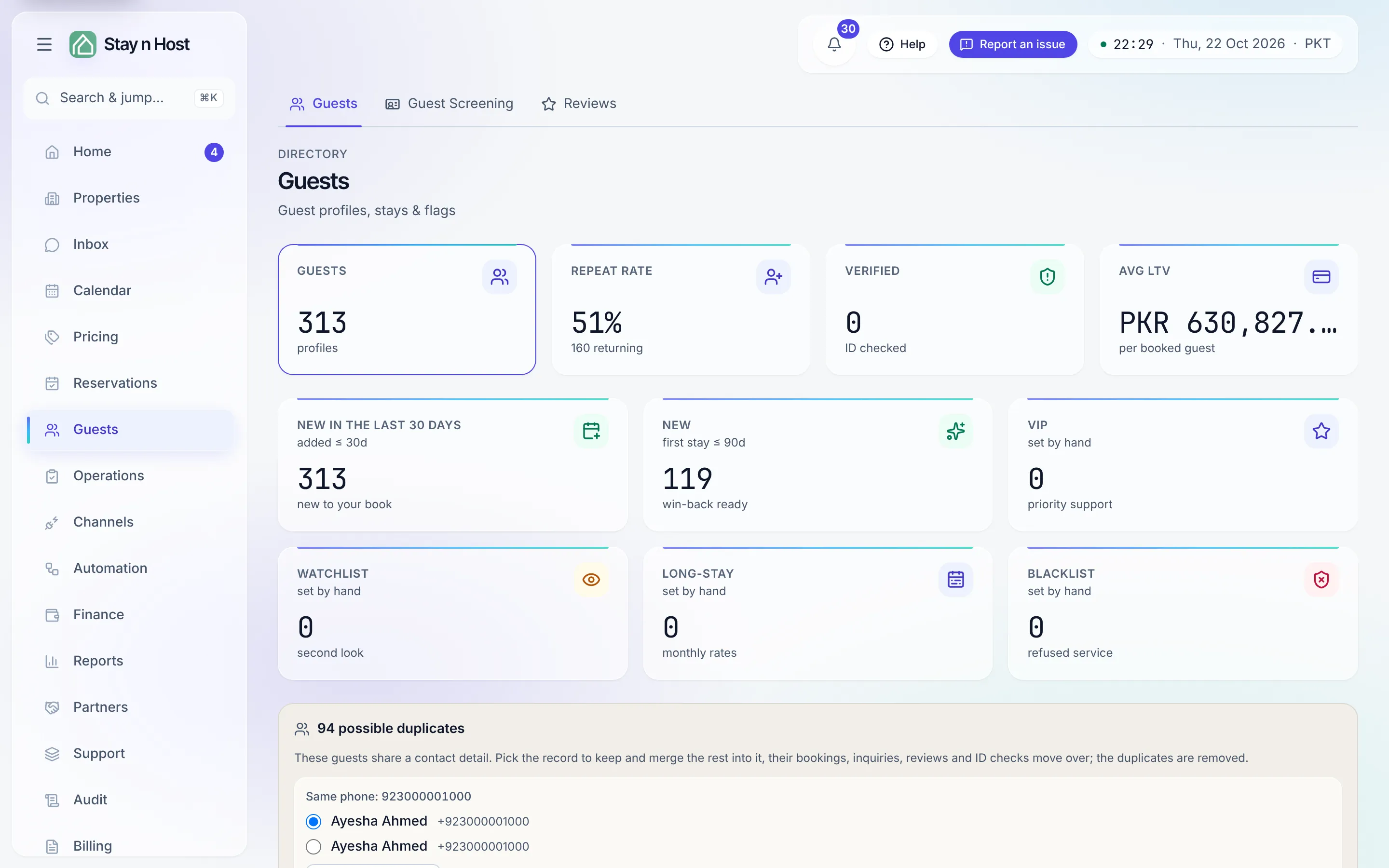
The Guests screen (Guests → Guests) is your guest directory: every profile, its stays, its flags, and what each guest is worth to you over time.
The directory
Section titled “The directory”The tiles count your whole guest base - profiles, verified IDs, flagged guests, repeat rate, and average lifetime value per booked guest. Filter the table by Verified, Pending, Flagged, VIP, Watchlist, Long-stay, or Blacklist, or search across all guests. New guest creates a profile by hand (walk-ins); most profiles arrive on their own when an inquiry becomes a booking.
New in the last 30 days shows how many profiles were added over the last 30 days of your workspace’s calendar (today and the 29 days before it). Click it to list only those guests; searching and scrolling for more stay inside that list. Click it again to see everyone. This is different from New, which counts guests whose first stay began in the last 90 days.
A profile
Section titled “A profile”Open a row to see everything on file for one guest:
- Stay history and upcoming stays, with lifetime stays, lifetime value, and average stay length.
- Contact - phone, email, WhatsApp, nationality, and the acquisition source.
- Guest screening - every ID verification round, with a shortcut to request a new check against a specific booking.
- Flags - the advisory tags (VIP, Watchlist, Long-stay) and the blacklist. Every flag change is listed in the Flag history with who made it.
- Note - an internal remark visible to your team, never to the guest.
- Reviews the guest has left after stays.
Merge duplicates
Section titled “Merge duplicates”When two live profiles share a phone number, WhatsApp, or email, a possible duplicates panel appears at the top of the directory. Pick the record to keep, press Merge duplicates, and confirm - the duplicates’ bookings, inquiries, reviews, and ID checks all move onto the kept profile, and the duplicate records are removed. The merge either finishes the whole set or changes nothing; it is hard to undo, which is why it asks twice.