
Anatomy of a booking
Open any row on Reservations -> Bookings (or Past stays) and you land on the booking’s record - the whole stay in one place. The header shows the guest’s name, the status pill, and the booking Ref code (with a copy button - this is the code a guest can read to you over the phone). If the booking began as an inquiry, an Inquiry chip beside the Ref names that inquiry’s reference and opens it. Depending on your role, the header also offers Record cash, Edit booking, Extend stay, and Delete duplicate.
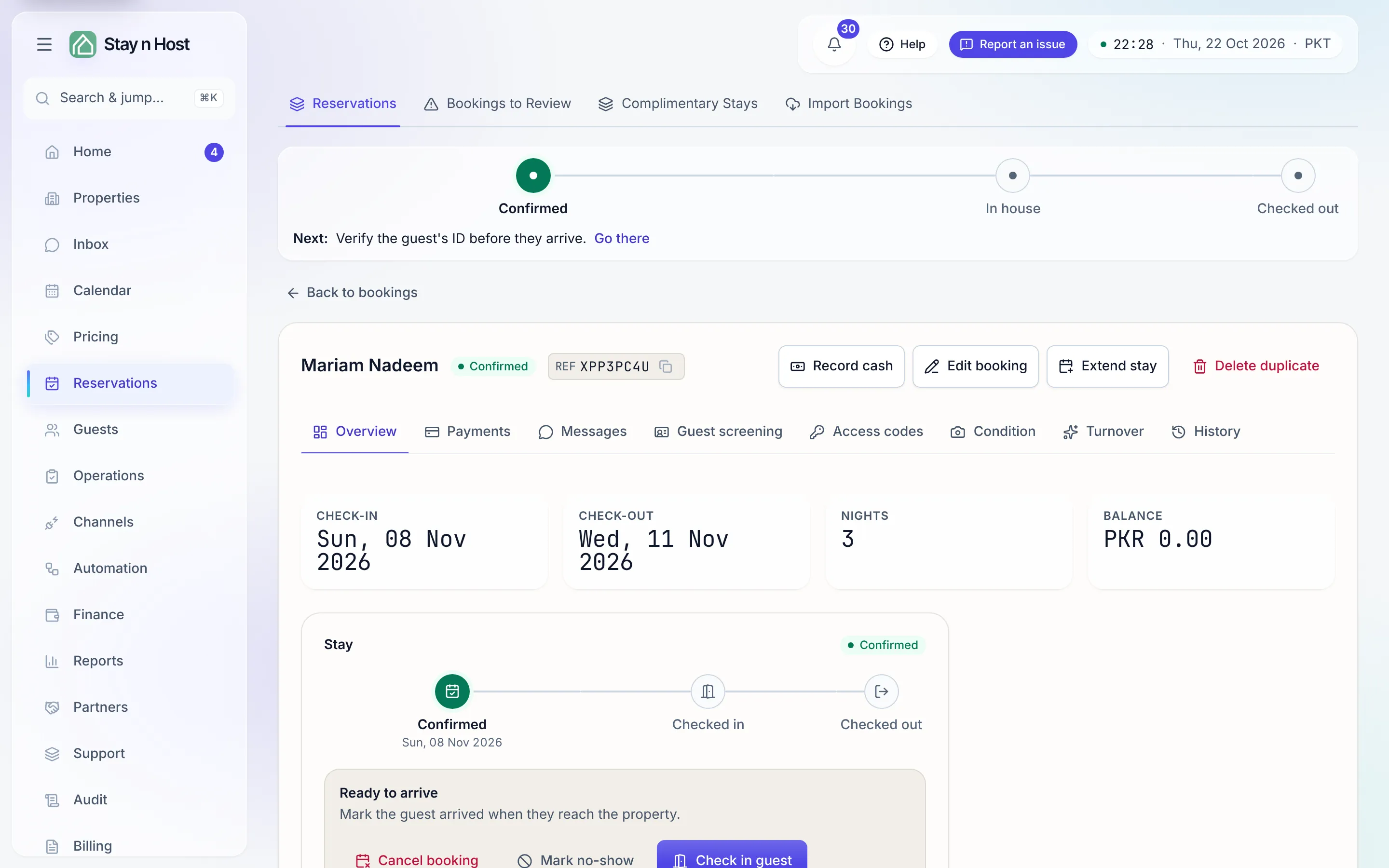
Above the tabs, the lifecycle rail shows where the reservation is - Confirmed, In house, Checked out (with the inquiry steps before them when it began as an inquiry) - and a Next line naming what happens next, with a link to the tab where it happens. See The reservations list.
Below sit eight tabs, ordered the way a stay actually unfolds:
| Tab | What lives there |
|---|---|
| Overview | Check-in, check-out, nights, and balance at a glance; the stay progress rail with the one next action (check in, check out); the Stay, Guest, and Money cards. |
| Payments | The Refunds panel when there is money that can go back, the payment history with invoices, and the evidence for each payment and refund. |
| Messages | The conversation with the guest for this booking - plus internal notes the guest never sees. |
| Guest screening | The ID check - request documents, review what comes back, verify or reject. This is one half of the door-code gate. |
| Access codes | The door codes for this stay - gate status, reveal, and the hand-off to the guest. |
| Condition | The condition record: photos and video of the unit before check-in and after check-out, the last turnover’s footage, plus damage notes. |
| Turnover | The read-only after-stay story: the cleaning chain, inspection rounds, and damage reports, each linking to its own housekeeping page. |
| History | The audit trail - every change to this booking, who made it, when, and the reason given. |
A few details worth knowing:
- Guest screening sits before Access codes on purpose: screening is half the gate that releases a code. If Access codes says a code is blocked on ID, the fix is one tab to the left.
- The rows are links. The property, unit, and guest name each open their own page; the phone, email, and WhatsApp rows dial, compose, or open a chat directly.
- The Money card follows the money. Beside Total, Paid so far and Balance it adds Refunded, Goodwill allowance and Net received once money has gone back, and Extras collected once extras were paid.
- Group bookings show the group’s money. If this booking is one unit of a multi-unit group, the Total, Paid, and Balance figures are the whole group’s - one deal, one price, one payment.
- An early departure shows the day the guest left. The Stay card reads Checked out early and Booked to with the original date.
- “Imported as” appears on the Stay card when the booking came in through a spreadsheet import - it is the reference the stay arrived under, so you can find it by your old code.