
Your subscription
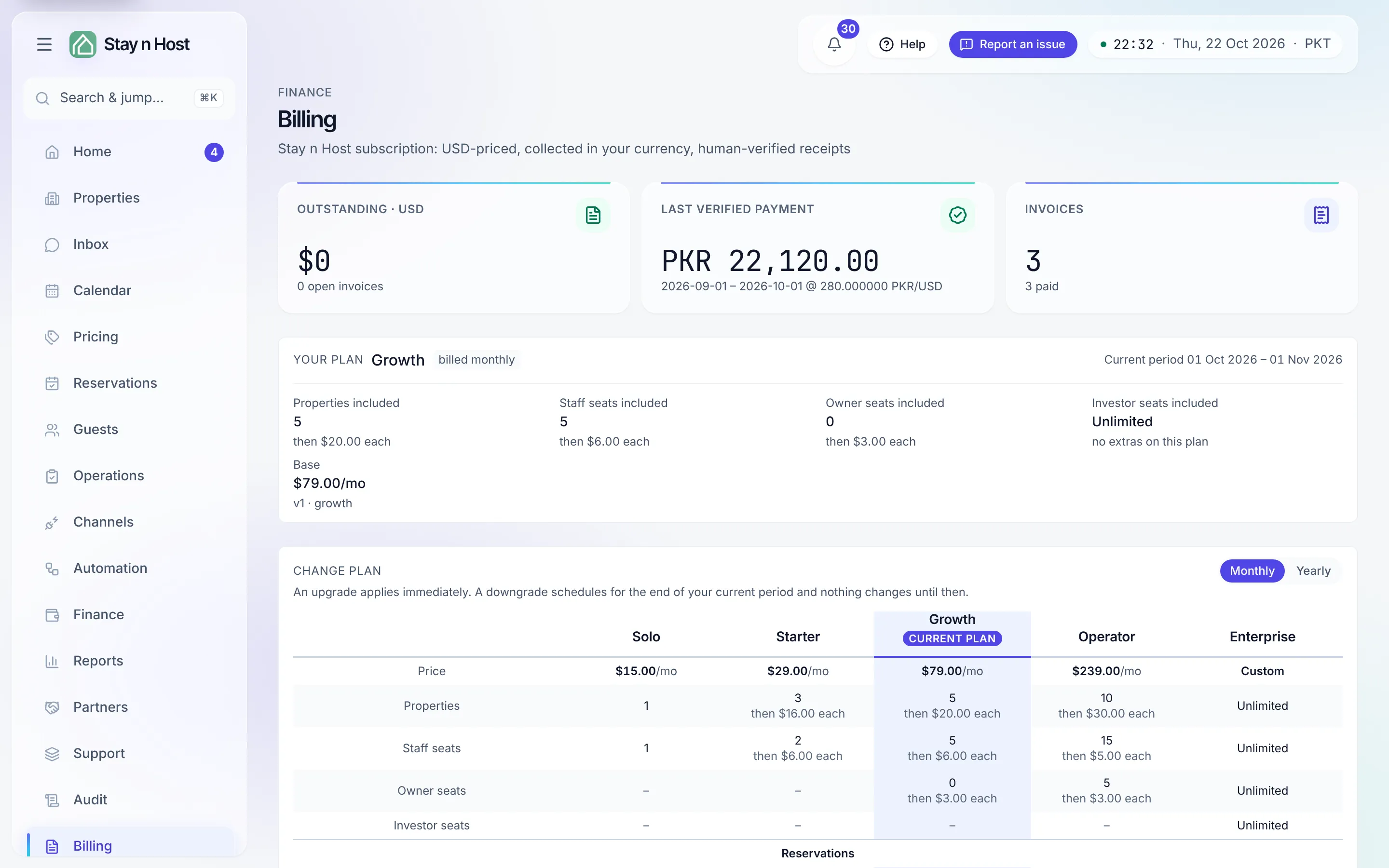
Billing is your Stay n Host subscription in one place: the plan you are on, the invoices raised against it, and the payments you have submitted. Prices are in US dollars, you pay in your own currency, and every payment is checked by a person on our side.
The plans
Section titled “The plans”| Plan | Monthly | Billed yearly | Included | Beyond that |
|---|---|---|---|---|
| Solo | $15 | $13 a month | 1 property, 1 seat | - (one property only) |
| Starter | $29 | $25 a month | 3 properties, 2 seats | $16 per property |
| Growth | $79 | $69 a month | 5 properties, 5 seats | $20 per property |
| Operator | $239 | $199 a month | 10 properties, 15 seats | $30 per property |
| Enterprise | By quote | By quote | Set with you | Set with you |
Roughly, each plan adds to the one before it: Starter brings housekeeping, the shared inbox, automations and channel sync (Airbnb, Booking.com, Expedia, Agoda, Vrbo and Google); Growth adds the lighter finance pages and the owner and investor portals; Operator adds the full finance suite, payroll, the booking website, Xero and QuickBooks export, and API keys and webhooks; Enterprise adds price rules. The Compare plans table on Billing is the exact list for your workspace, and hovering a plan when you sign up shows the same.
Every self-serve plan starts with a 14-day free trial. A 2% fee applies to reservations made on your own booking website, and only to those.
Enterprise is by quote
Section titled “Enterprise is by quote”Enterprise is priced per operation, so it is set up with you rather than bought from a screen. Choosing it when you create a workspace opens a short form instead of creating one: your name, company, an optional phone number, how many properties, and what you need. Contact sales sends it, and our sales team replies to your account email. Pick another plan if you want to start a trial now. On Billing, Enterprise’s Contact us button opens the pricing page.
Add-ons
Section titled “Add-ons”Some features can be added to a plan that does not include them. Add-ons are arranged with us rather than bought from Billing; once added they show on your plan card under Add-ons you bought.
| Add-on | Price (USD a month) |
|---|---|
| Direct-booking site (custom domain and guest checkout; the 2% fee applies) | $32 |
| AI messaging (reply drafts, the per-property assistant and guarded autopilot) - no plan includes it, so this add-on is the only way to get it | $10 per AI unit |
| Price rules (the dynamic pricing add-on) | $9 per pricing unit |
| Advanced verification pack | $39 |
| Xero / QuickBooks export (journal files, not a live sync) | $25 |
| Accounting and treasury module | $99 |
| Payroll | $59, plus $3 per employee |
| Owner portal seats | $3 per seat |
| Investor portal seats | $3 per seat |
| Premium support | $249 |
Smart-lock integration (TTLock and Nuki) is included on every plan; it is not an add-on.
Your plan and the trial
Section titled “Your plan and the trial”The plan card names your plan and period; Compare plans shows them side by side, monthly or yearly. An upgrade applies immediately and is billed at the new rate from today. A downgrade is scheduled for the end of your current period, with a plain list of what you would lose, and nothing changes until then. Plans include a number of properties and staff seats; going past them is either charged per extra or refused, depending on the plan.
A trial banner counts down to the end date and says what happens: on that date we raise your first invoice for the month ahead; settle it to keep going. If it is not paid, the workspace goes read-only until it is, and nothing is deleted.
Invoices and paying them
Section titled “Invoices and paying them”Each invoice moves Open → Receipt submitted → Paid (or Void), with its line breakdown on the row. One invoice can cover two cycles: your plan in advance for the cycle ahead, and any usage above your plan’s included amounts for the cycle that just ended.
There is no card payment. Card and PayPal show as coming soon. Today you pay by:
- Bank transfer - send the money to the account under Where to send a bank transfer, quoting the invoice’s payment reference, then Submit payment with the amount you paid, the date, the bank transaction number and a screenshot of the transfer.
- Cash - paid to a Stay n Host person; record who received it (and where, if you like). The system issues the receipt number the moment it is recorded.
You pay in your own currency. When we verify a payment the exchange rate is fixed at that moment, and the amount paid must land within 1.5% of the US-dollar amount due at that rate. Your submission shows Pending verification until someone on our side confirms it - and while a receipt is under review, any overdue countdown is paused. A rejected payment says why, and the invoice reopens so you can submit again.
When a bill goes unpaid
Section titled “When a bill goes unpaid”The ladder is gradual and reversible, and the page tells you which rung you are on:
- Overdue - an amber banner with the days of grace remaining.
- Read-only - the workspace locks: your data is safe and readable, but changes stop. A Pay now button sits in the banner.
- Suspended - after prolonged non-payment; settle and contact us to reactivate. Nothing is deleted at any rung.
Feature locks look like this
Section titled “Feature locks look like this”Some pages are sold with specific plans - the finance suite is the common one. A locked page never errors: its row in the rail is marked locked and takes you here, with a banner naming the feature: “Full finance suite is not on your current plan. Contact us to add it to your subscription.” If you followed a link and landed on Billing unexpectedly, that banner is why.
What’s next
Section titled “What’s next”- Seat-limit message when someone accepts an invitation? This is where the limit lives - Invite a teammate.
- Every plan change and payment lands in the audit trail.