
Work with past stays
Bookings and Past stays are two stages of the same Reservations list. Bookings is the working set - everything upcoming or in-house that still needs something from you. The moment a stay ends, or turns out never to have happened, it moves to Past stays: checked out, completed, cancelled, and no-show. Every booking is in exactly one of the two stages, never both.
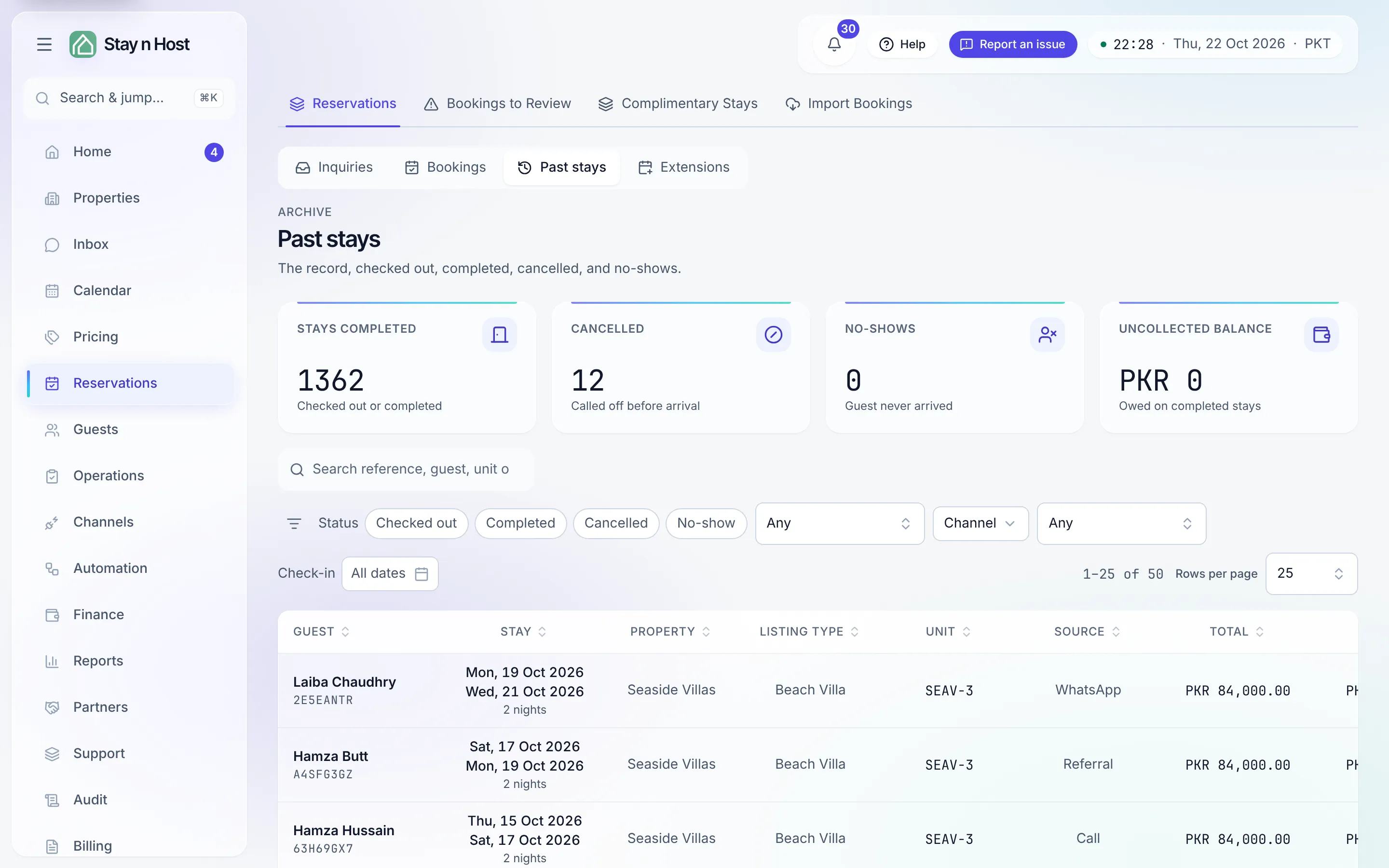
Reading the stage
Section titled “Reading the stage”Open Reservations and pick Past stays in the stage control. The list is sorted by departure, most recent first - it answers “who was here recently?” before anything else. A stay that ended early shows the day the guest actually left. Four tiles summarize the archive, and each one is a one-tap filter:
- Stays completed - checked out or completed.
- Cancelled - called off before arrival.
- No-shows - the guest never arrived.
- Uncollected balance - money still owed on completed stays.
The tiles are counted across your whole history, not just the rows on screen.
Finding a stay
Section titled “Finding a stay”The search box covers reference, guest, unit, and property; the filter bar narrows by status, property, channel, check-in dates, and balance. If a stay came in through a spreadsheet import, you can also recognize it on its record by the Imported as row - the reference it arrived under.
Opening a row lands on the same full booking record as a live stay - all eight tabs, including History, the Turnover record, and the Condition evidence. Nothing is archived away; it has simply stopped needing you.