
Read your P&L
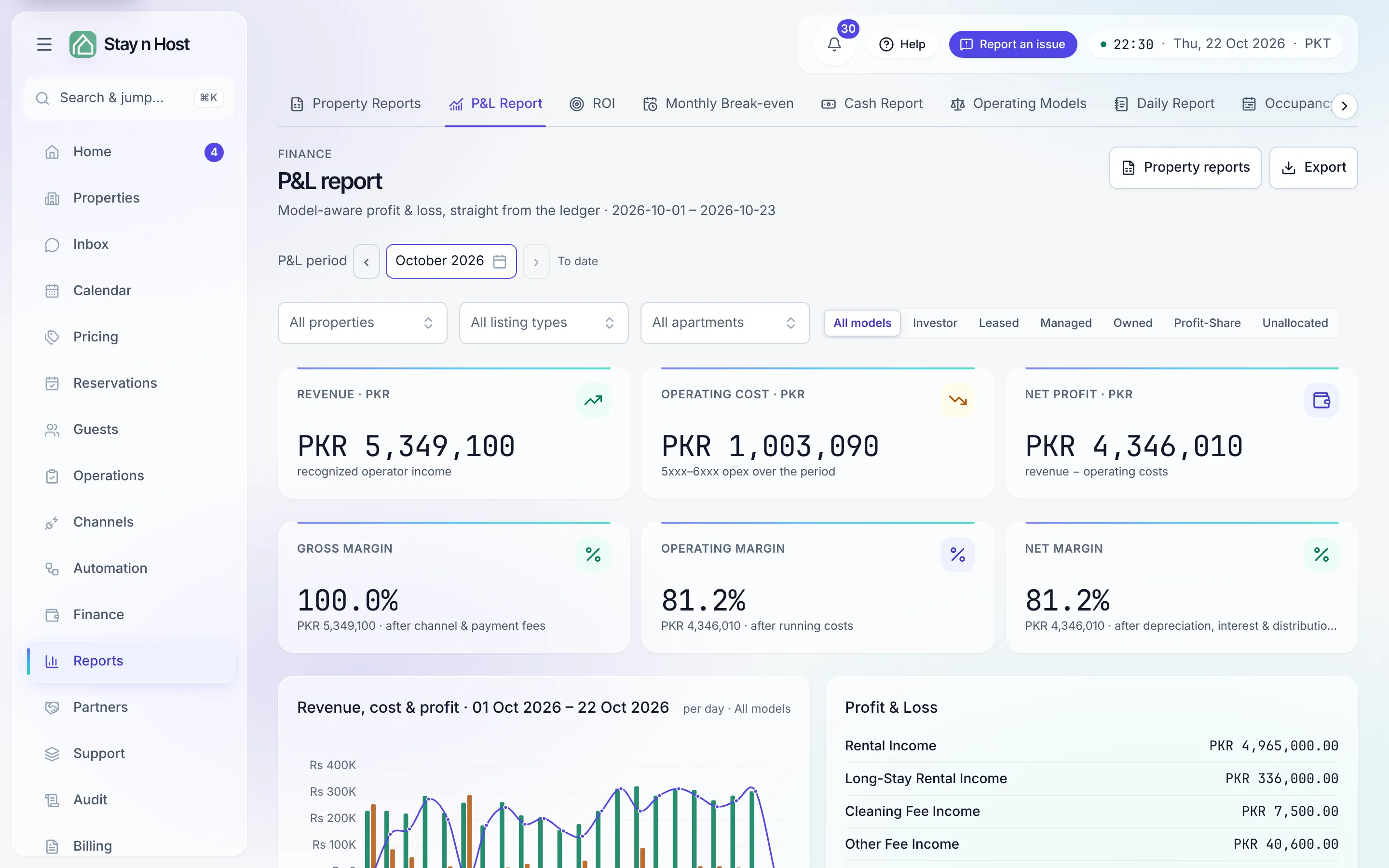
The P&L (profit and loss) shows what you earned and spent over a period, straight from the ledger - no spreadsheet assembly. Open it from Reports -> P&L Report, then pick the window with the P&L period control (default: this month to date); everything on the page describes that window.
Narrow it to a property or an apartment
Section titled “Narrow it to a property or an apartment”Under the period picker sit three filters: All properties, All listing types and All apartments. Pick one and every figure on the page - the tiles, the margins, the trend, the statement and the property table - describes only that part of your estate. A chip says what you are looking at (Showing and its name), with Clear beside it. Changing a property clears the listing type and apartment under it, so you never combine two that cannot both hold.
Filtering by listing type leaves out money booked to a whole property rather than to one apartment, and the page says so. The same three filters, working the same way, are on Finance -> Payments, Finance -> Expenses, Finance -> Treasury and Partners -> Owner Payouts.
For the same figures broken down account by account and line by line, click Property reports in the header: it opens Property Reports for the same period and the same narrowing.
What “model-aware” means concretely
Section titled “What “model-aware” means concretely”Every unit runs under an operating model, and the report groups by it - one table per model present in the period (Owned, Leased, Managed, Investor, …), each row a property with Revenue, Operating costs, and NOI (net operating income: revenue minus operating costs), expandable to its units. When more than one model is present, a filter appears to view one model at a time.
The concrete difference: on a managed unit, the guest’s gross payment is the owner’s money - a liability you hold, never your revenue - so it doesn’t appear here at all. A managed row’s revenue is your own income only: your management fee and recharges. That exclusion happens in the books themselves, not as a display subtraction, so no filter or export can accidentally re-add it.
The tiles and the margin ladder
Section titled “The tiles and the margin ladder”The top band: Revenue (recognized operator income), Operating cost, and Net profit (revenue − operating costs). Below it, three margins, each stating what came off at that step:
- Gross margin - after channel and payment fees (costs you only pay because a booking happened).
- Operating margin - after the running costs of the portfolio: cleaning, utilities, payroll, rent.
- Net margin - after depreciation, interest, and distributions to capital providers.
If a tier equals the one above, nothing was posted at that step - that’s truth, not a bug.
The statement and the trend
Section titled “The statement and the trend”The Profit & Loss panel is the classic statement: income lines, expense lines, and Net operating profit at the bottom - the same figure as the Net profit tile, by construction. Beside it, Revenue, cost & profit charts the period you picked: per day for a short window, per month for a long one. A quiet stretch draws as quiet rather than being skipped. A By length of stay column splits each property’s revenue by stay length, which matters if your management agreements pay differently on long stays.
Take it away
Section titled “Take it away”Export in the header downloads the statement (income, expenses, net operating profit) and the property rows as CSV, Excel or PDF. See Share the books with your accountant.
Revenue counts by the night
Section titled “Revenue counts by the night”Revenue is recognized per occupied night, not when cash arrives. A payment collected in March for April nights is April revenue here - cash timing lives on the Treasury instead.
What’s next
Section titled “What’s next”- The same money by property and apartment: Read the property reports.
- Is a unit worth keeping at all: ROI and the forecast calculator.
- Which day of the month a unit turns profitable: Monthly break-even.
- Freeze the month behind these figures: Close a month.