
Read the run history
The Run history tab on the Agent Hub (Automation → Agent Hub → Run history) is the record of every automation run: what fired, for whom, and whether it went out. When a guest says “I never got my confirmation,” this is where the answer lives.
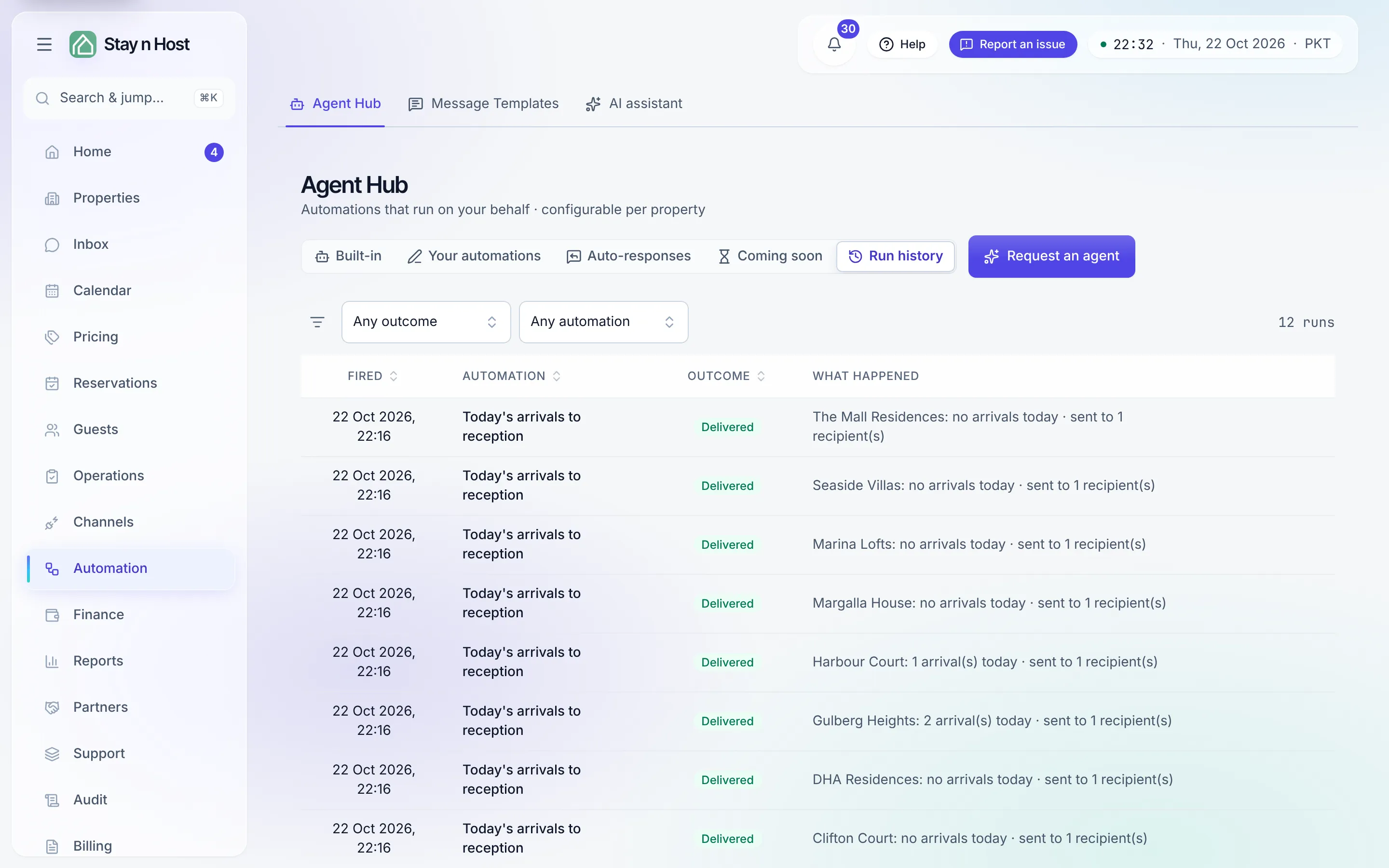
The table
Section titled “The table”Run history is a table of the newest 200 runs, newest first, with five columns:
| Column | What it shows |
|---|---|
| Fired | When the run happened, in your workspace’s time. |
| Automation | The built-in’s name, or the title of an automation you wrote. |
| Outcome | A status chip (below). |
| What happened | A one-line summary with its target - “Confirmation to {guest} · {reference}”, “{property}: 3 arrival(s) today · sent to 2 recipient(s)” - plus the error text when a send failed. |
| Actions | Resend, on the runs that can be sent again (see below). |
Sort by Fired, Automation or Outcome, narrow with the two filters above the table (Any outcome and Any automation), and page through with Rows per page. Clear resets the filters.
| Outcome | Meaning |
|---|---|
| Delivered | The message went out to its recipients. |
| Held | The run stopped on a blocker, with the reason - it retries by itself once the blocker clears. |
| Skipped | Nothing to send, by configuration - for example a property with no reception email; the reason is named. |
| Partial | Some recipients got it and some did not. |
| Failed | The send errored; the error text shows on the row. |
| Sending | The run is being handed over right now; it changes to its outcome in a moment. |
“The guest says they got nothing”
Section titled ““The guest says they got nothing””- Open Run history, pick the automation under Any automation, and find the guest’s booking - the summary carries the booking reference.
- No run at all? The automation probably was not on for that property yet, the booking predates it (automations never backfill), or one of its conditions left this booking out. Check the automation’s card.
- A held run? The reason is on the row - payment not verified, ID not verified, no code on the unit, no email on file. Clear the blocker and the send happens on its own; held door codes also wait on Home → Today under Automations waiting on you.
- A delivered run? The product handed the message over - check the guest’s spam folder or the contact details on their profile, then send it again if you need to (below).
Send a delivered message again
Section titled “Send a delivered message again”On a Delivered run about one booking, Resend asks “Send this again?” and, once you confirm, sends that message again, written from today’s booking details (so a corrected address or a changed date is picked up). The new send appears in the history once it has gone out.
Resend is offered on:
- Booking confirmation to the guest
- Thank-you after checkout
- Automations you wrote yourself
It is never offered on the door code, which leaves only through its own payment-and-ID gate, nor on the reception digests, the arrival alert or the daily ops report. The automation must still be switched on (otherwise the request is refused), and the booking must still qualify for it today (otherwise nothing is sent). Resending needs a seat that can configure the hub.