
Search, filters and the map
Your booking site’s search runs against the same calendar your team works in. There is no nightly export and no cached availability to fall behind, which is why a night that is sold cannot be offered: the oversell guard is a uniqueness rule in the database, not a job.
Nothing on this page needs configuring. It works from the moment you publish, on the properties you published, and this article is about what your guests get and what you can do to make it answer better.
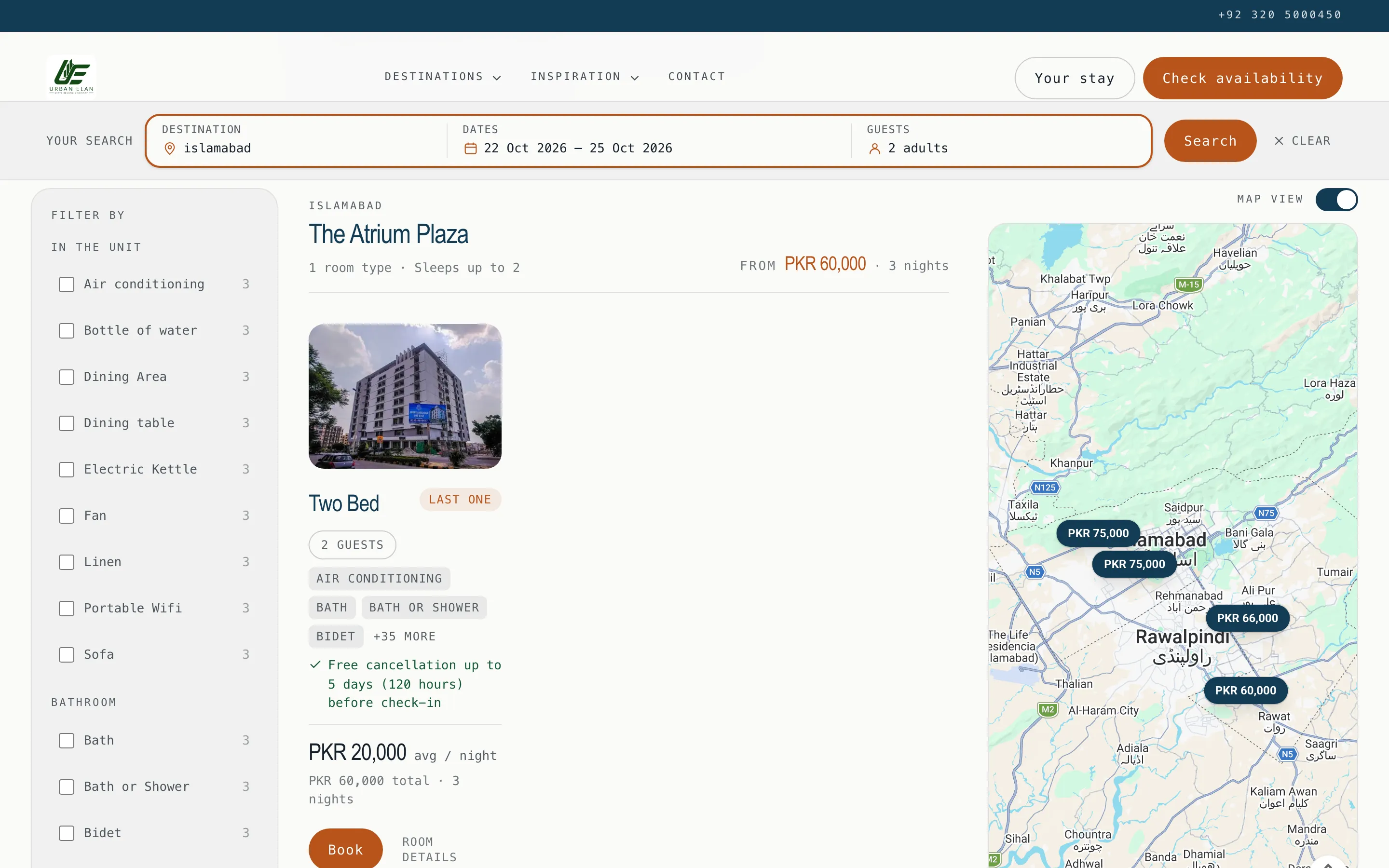
The search box
Section titled “The search box”| Field | What it does |
|---|---|
| Location | Type-ahead over your cities and your property names, so “Zeta” and “Islamabad” both work. |
| Dates | One calendar that stays open across the check-in and check-out clicks, showing two months. Sold-out nights are drawn as unavailable rather than free. |
| Adults / children | Capped at 10+ so a real group fits. |
The results page is a plain URL. It is shareable, bookmarkable, back-button-correct, and you can paste a guest’s link into your own browser to reproduce exactly what they saw when they tell you “it said there was nothing”.
“I’m flexible”
Section titled ““I’m flexible””A guest with no dates picks a length (weekend, 1 week, 2 weeks, 1 month) and a month, or Anytime, and gets back when the portfolio is free for that length.
Most direct enquiries start here rather than with a date, so it is worth checking that your rates are set far enough forward for the flexible search to have something to say.
The results: one flat grid
Section titled “The results: one flat grid”Every bookable room from every property comes back in one flat grid, in a single order, rather than a block per property. A property with one room no longer leaves a row two thirds empty, and the sort orders the tiles actually on screen, so “lowest price” means the cheapest tile comes first.
Each tile carries a photo strip: the guest swipes, or uses the arrows, through that room type’s own photos without leaving the results. The tile also shows the review score when the property has reviews, the price for the guest’s dates, and a way to book.
Filters and sorting
Section titled “Filters and sorting”The filter rail sits on the left of the results on a computer, always visible and taking no space above the first result. On a phone it folds into a Filter by section above the results, closed until the guest opens it (and open while a filter is applied). It is built from the amenities your units actually carry, with a live count beside each. A guest cannot pick a filter that returns nothing, because a filter matching nothing is not offered, and the rail stays in place even when the ticked filters empty the results, so the guest can see what they ticked and clear it.
Sorting is a <select> inside the same form: lowest price, highest price,
capacity, or name. The server orders the list, so the order is a fact about your
inventory rather than something the browser decided.
When the dates do not work
Section titled “When the dates do not work”Rather than an empty page, the search offers alternative dates near the ones asked for. A guest who wanted the 14th and can take the 16th is a guest you keep.
The map
Section titled “The map”Map view puts a price pin on each property, drawn for the guest’s own dates. It is off until the guest opens it, because the map provider sets cookies and an anonymous guest has not agreed to that yet. On a wide screen the open map is pinned, full height, on the right of the results, so it stays beside every tile the guest scrolls past; on a smaller screen it sits as a band above the list. Hovering a pin shows the listing details and rating; clicking opens the property card with its photos and arrows.
What the guest carries with them
Section titled “What the guest carries with them”The search travels: dates, guests, destination and the amenity filters the guest ticked are carried onto every property page, room page, city hub, collection and the booking form itself, and remembered on the guest’s own device for up to 30 days until they clear it. A guest who clicks into a room and back out has not lost their search.
What’s next
Section titled “What’s next”- Collections and destination hubs - the pages a filter cannot express.
- What your site charges.
- Block dates - the other way a night stops being sellable.