
Verify or reject a payment proof
A guest’s uploaded proof is a claim, not money. It becomes revenue only when a person checks it against the amount due and verifies it - and that check is yours.
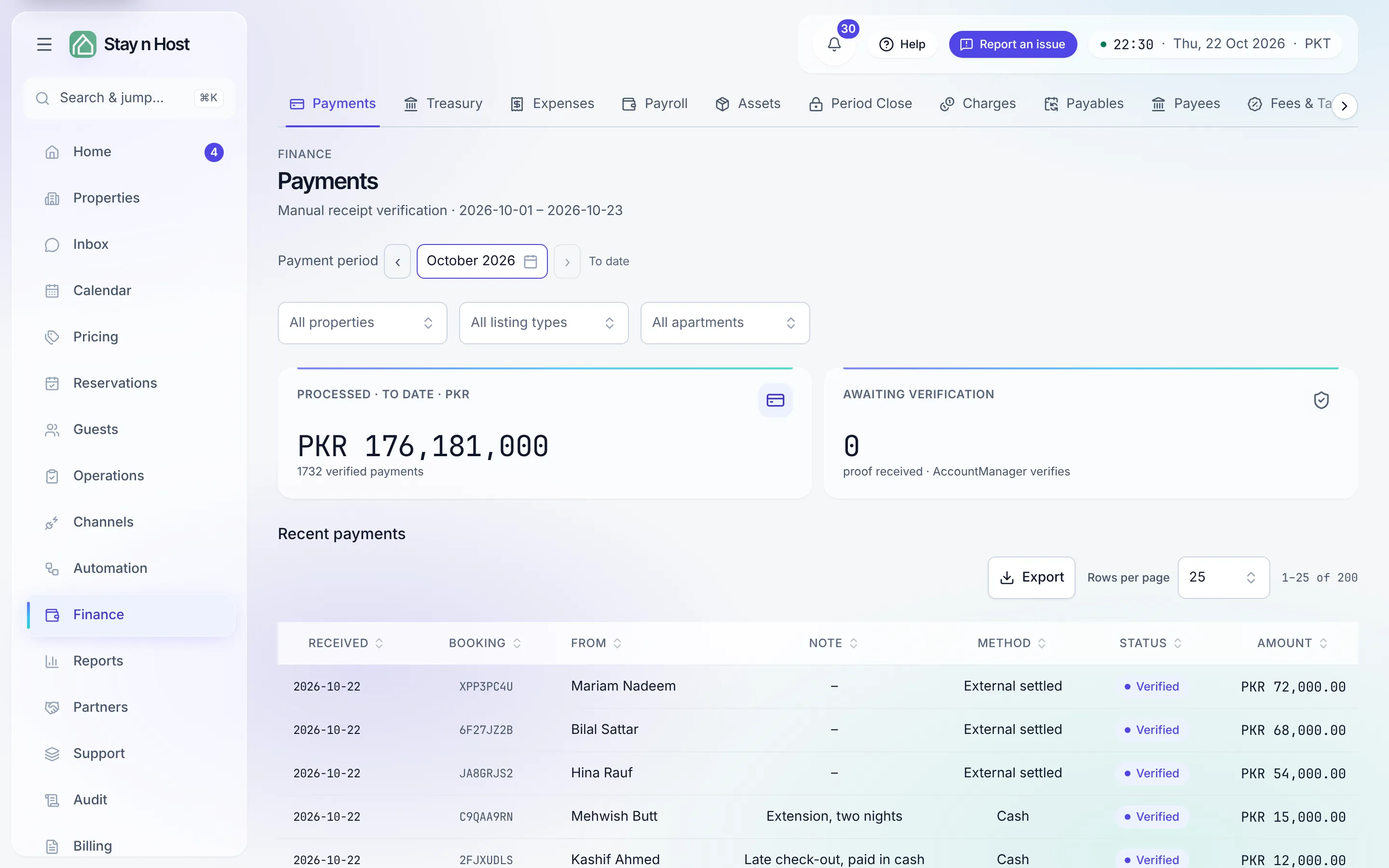
Where proofs wait
Section titled “Where proofs wait”The Payments board (Finance -> Payments) shows an Awaiting verification tile
and every recent payment with its status. On Reservations -> Inquiries, a stay with
unchecked money carries a
Paid, unverified chip - and Paid, not held if the money arrived but no unit could
be held, which means those nights are still sellable. The “Guest sent payment proof”
notification opens the inquiry’s record straight at its payments
(/reservations/<inquiry>/payments).
Narrow and export the board
Section titled “Narrow and export the board”- Payment period picks the window every figure on the board describes.
- Beside it, three filters narrow the board to part of your estate: All properties, All listing types and All apartments. The board then says Showing {name}, with Clear to go back to everything. A receipt that settles more than one apartment is shown in full under each of them, and the page says so; for what one apartment earned, use the property reports.
- Export downloads the payments list as CSV (.csv), Excel (.xlsx) or PDF (.pdf): every row in the current period and filter, in the table’s columns.
Verify a proof
Section titled “Verify a proof”-
Open the payment. Clicking a row on the board opens the payment’s own page: amount, method, sender, transfer reference, when it was paid versus when it was recorded, and the screenshot evidence. The sender’s name and reference were typed by the guest - read them, never trust them.
-
Compare against your account. The evidence tells you what the guest says they sent; your bank statement tells you what landed. The guest never states an amount - the recorded figure comes from what was due on the quote.
-
Verify on the inquiry. An unverified payment’s page offers Verify on the inquiry. On the inquiry, choose Convert to booking. The dialog confirms the held unit and shows the money: Amount on the proof, the editable Final total, Verified as received (what actually landed), and To collect at the property (whatever’s left).
-
Click “Verify & confirm booking.” The payment posts to your books, the booking is confirmed, and the Paid, unverified chip clears everywhere.
Reject a claimed payment
Section titled “Reject a claimed payment”If the money never arrived, open the locked inquiry and choose Cancel and release. The claimed payment is rejected on the record, the held nights go straight back on sale, and the inquiry ends as rejected by policy. The action - who did it and when - lands on the audit trail.
What verification unlocks
Section titled “What verification unlocks”- The money posts into your books as verified revenue.
- The booking confirms and moves through its lifecycle.
- Payment verified is one half of the dual gate (payment ✓ and ID ✓) that releases a smart-lock code to the guest.