
Refund a guest
Refunds run as a request and a decision: one action files how much and why, a second action pays or rejects it. Nothing leaves your books until someone clicks Pay refund and confirms.
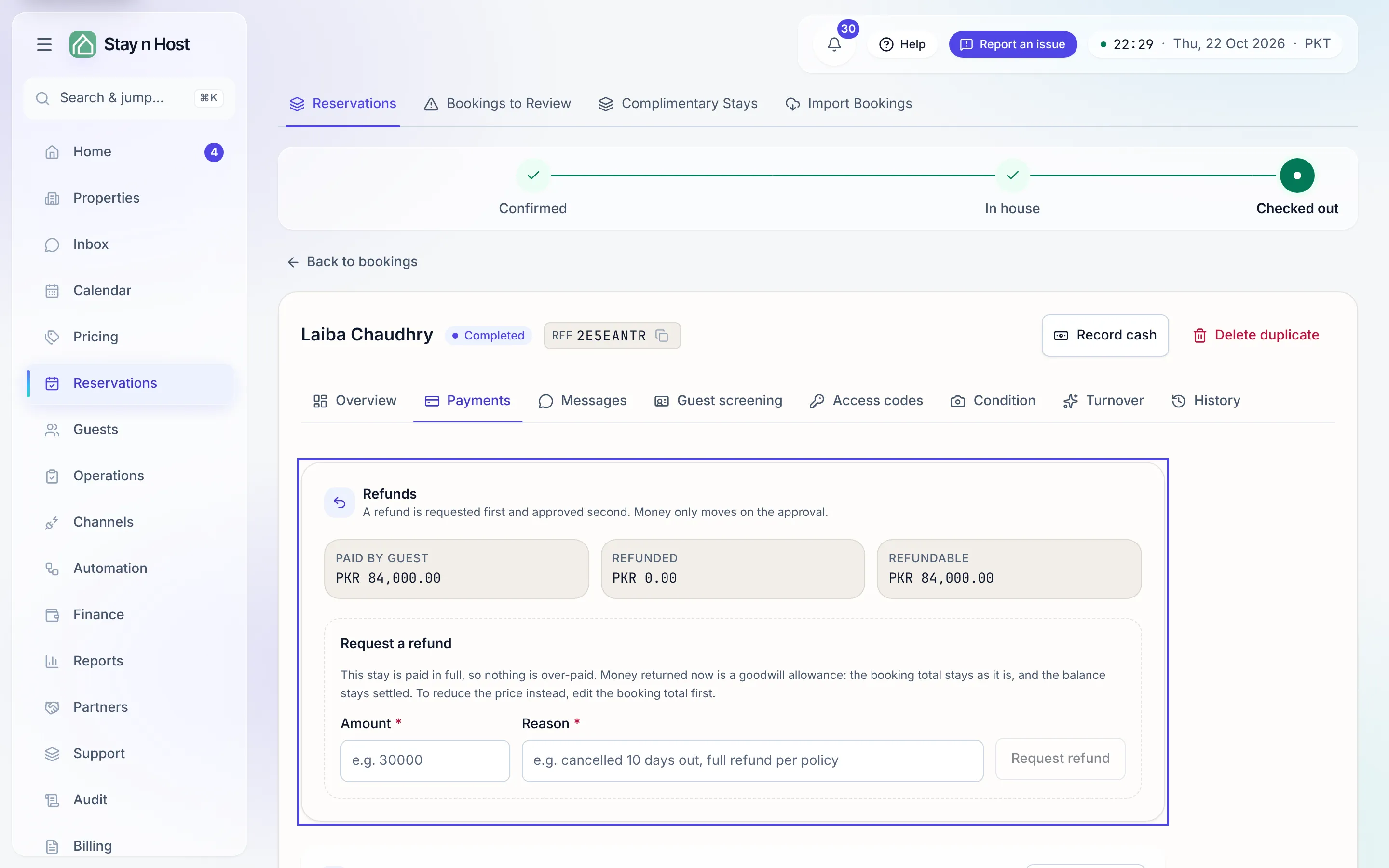
Where refunds live
Section titled “Where refunds live”Open the booking from Reservations -> Bookings (or Past stays) and go to its Payments tab. The Refunds panel sits at the top, above the payment history. It appears on any booking that has verified cash and something that can go back: a confirmed or in-house stay, a stay that has already checked out, and a cancelled or no-show booking alike. A booking with no verified payment, or one that is simply paid up with nothing refundable and no refund history, shows no panel.
The panel opens with its figures:
| Tile | What it is |
|---|---|
| Paid by guest | Verified cash on the booking. |
| Refunded | Refunds already paid. A request that is still waiting moves no money and is not counted. |
| Net received | Paid by guest minus Refunded: what the stay actually took. Shown once a refund has been paid. |
| Goodwill | Goodwill allowances already given. Shown once there is one. |
| Refundable | The most you can file right now, for the kind of refund you are filing. |
The booking’s Overview tab says the same in its Money card: once money has gone back it adds Refunded, Goodwill allowance and Net received rows beside Total, Paid so far and Balance.
What can be refunded
Section titled “What can be refunded”How much may go back depends on where the stay is:
- Cancelled or no-show. The stay never happened, so the whole advance can go back.
- A live or departed stay. The guest still owes the booking total, so a refund that lowers the price can only return what was paid above that total. The panel says so in a line under the tiles. If the price really changed, edit the booking total first (see Edit a booking or delete a duplicate), then return what is now over-paid.
- A stay paid exactly in full. Nothing is over-paid, so the panel offers a goodwill allowance instead (below). This is also how you refund a stay that has already checked out: a departed stay’s total is fixed, so goodwill is usually the refund that applies.
Two further limits can lower the Refundable figure, and the panel names them when they bite: money already paid out to a property owner or an investor, and payments that were never posted to the books.
Two kinds of refund
Section titled “Two kinds of refund”When both are possible, the request form first asks What kind of refund is this?
- The stay costs less - a renegotiated price or a partial cancellation. Lower the booking total to match, then return what is over.
- Goodwill: the price stands - compensation for something that went wrong. The booking total is left alone, so the stay still reports what it actually sold for, and the balance stays settled.
When only one kind fits, the form says which instead of asking. On a stay paid in full it reads: “This stay is paid in full, so nothing is over-paid. Money returned now is a goodwill allowance.”
Request a refund
Section titled “Request a refund”-
In the Refunds panel, under Request a refund, pick the kind if the form asks.
-
Enter the amount in the booking’s currency. The field takes the currency’s own decimals, so you can file exactly what is refundable, for example
44,000.75. The app refuses anything above the Refundable figure. -
Give the reason. It is mandatory (for example “cancelled 10 days out, full refund per policy”) and stays on the refund row for whoever decides it, and for whoever reads the books later.
-
Click Request refund. The row appears as Awaiting decision, with the date it was requested.
Pay or reject a request
Section titled “Pay or reject a request”A seat holding refund approval sees Pay refund and Reject on each waiting row.
-
Click Pay refund. The confirmation is blunt: “{amount} goes back to the guest and posts to the ledger. This cannot be undone from here.”
-
Attach the transfer proof if you have it. Under Transfer proof (optional), click Choose a file and pick the screenshot or receipt of the bank transfer (images, PDFs and short clips, up to 15 MB). It is optional because you usually confirm first and transfer second. This part of the dialog appears for seats that can attach payment evidence.
-
Click Yes, pay refund. The refund posts to the ledger, and the row shows the date it was paid.
Reject closes the request with no money moved; the reason it was filed with stays on the record.
The transfer proof on the Payments tab
Section titled “The transfer proof on the Payments tab”Further down the same Payments tab, the Refunds list shows money returned to the guest beside the payments that brought it in: each refund’s amount, status (Awaiting approval, Refunded or Rejected), reason, dates, and its Transfer proof. A paid refund with no proof yet reads “No transfer proof attached yet.” and offers Add proof, so the screenshot you take after making the transfer lands on the refund it belongs to.
The refund also appears in the booking’s payment history as Money returned to the guest, dated when it was requested and when it was approved and paid.
What’s next
Section titled “What’s next”- Read a booking’s Payments tab
- Reconcile the cash report
- Books & reports - where the outflow lands