
Answer guests with the AI assistant
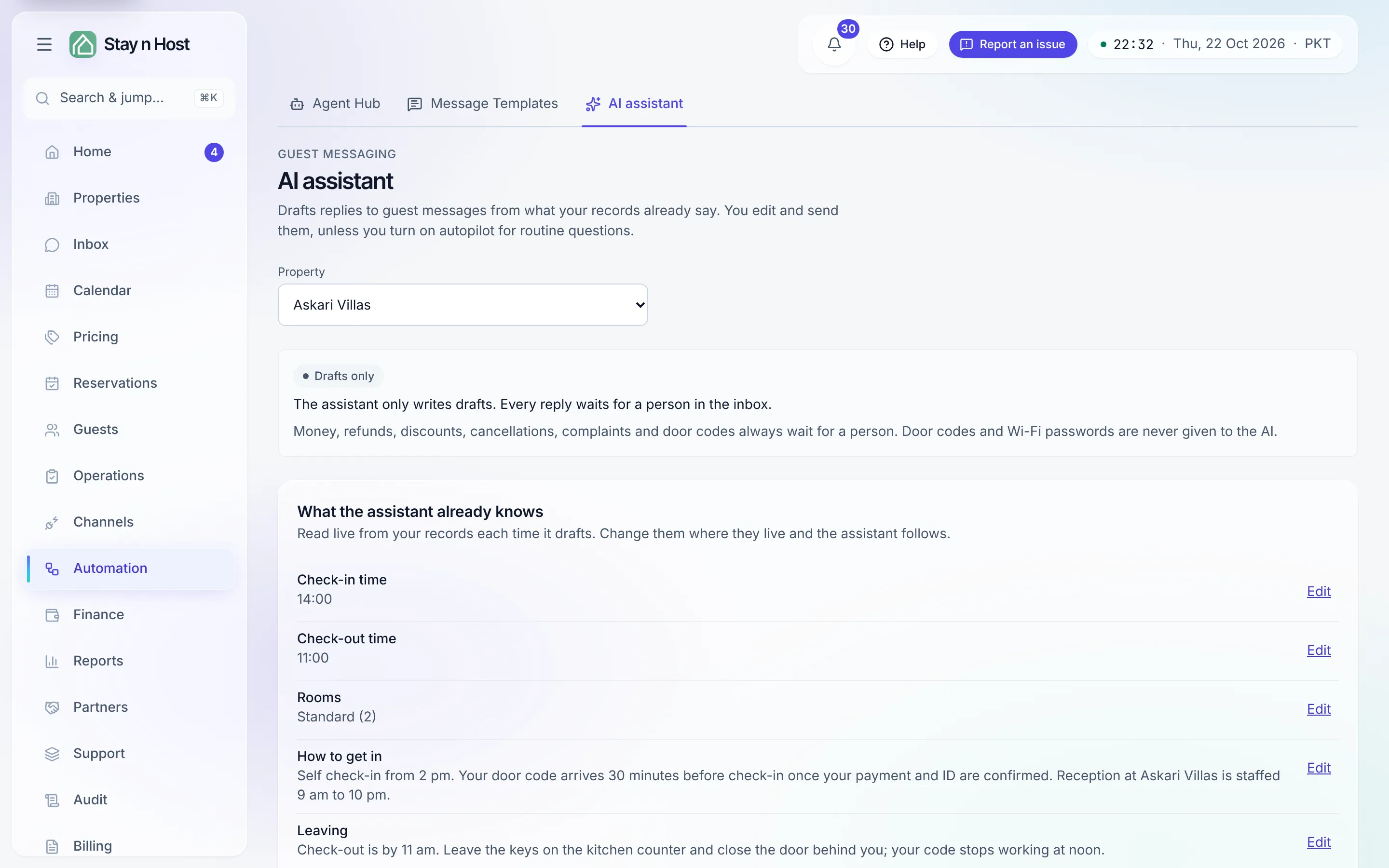
The AI assistant writes replies to your guests from what Stay n Host already knows: the property’s check-in and check-out times, how to get in, parking, rubbish, luggage, the house manual, your unit types, your cancellation terms, your optional extras and their prices, the guest’s booking, and which units are free around their stay. You add your own facts on top.
It works in two ways:
- Drafts (always on with the add-on). In the inbox, press Draft reply on a conversation. The draft lands in the reply box; you read it, edit it and press Send. Nothing goes to the guest until you do.
- Autopilot (off until you turn it on, per property). Routine questions are answered by themselves when the assistant is at least as sure as the threshold you set.
What never goes out automatically
Section titled “What never goes out automatically”Money, refunds, discounts, cancellations, complaints and door codes always wait for a person, whatever the assistant thinks. Two checks decide this, and either one is enough to hold a reply: the assistant names the topics of every message, and Stay n Host also reads the guest’s message and the draft itself for those words. Every guest message since your last reply is checked, not only the newest. A held reply shows on Home → Today, under Automations waiting on you as a guest question for a person, with Open conversation, and in the run history.
Door codes and Wi-Fi passwords are never given to the AI. Codes and passwords on file are removed from everything the assistant reads, including old messages in the thread, before it reads them, and again from what it writes back.
Set it up
Section titled “Set it up”-
Open Automation → AI assistant (
/ai-assistant) and pick the property. -
Read “What the assistant already knows”. Each line comes live from a record, with an Edit link to where it lives. A line that says Not set yet is something it cannot answer.
-
Answer the questions under “more worth adding”. These are questions guests ask that nothing answers yet. Answer this adds the question to your own facts; write the answer and save.
-
Choose a tone and any standing rules, for example “always sign off as the front desk team”.
-
Decide about extras and discounts. The assistant may offer your optional extras at their catalogue prices. Your discount policy is off by default; when on, a draft may quote it, and autopilot still never sends a discount.
-
Save assistant.
-
Optionally turn on autopilot: tick Answer routine questions automatically, pick Send only when at least this sure (85% is a sensible start), and press Save autopilot. This needs the Agent Hub permission, because it is an automation like the others in the hub (it appears there as AI replies to guest questions).
When it cannot answer
Section titled “When it cannot answer”If your records do not answer the question, the draft says a member of the team will get back to them and tells you what fact would have helped. It does not guess. Add that fact and the next draft can answer.