
Welcome to Stay n Host
Stay n Host runs your short-term rental business end to end: guest conversations, quotes, bookings, cleaning, door codes, money in, money out, and the reports your owners and investors read. This tour takes about three minutes and shows you where everything lives.
The shell
Section titled “The shell”Everything happens inside one layout:
- The rail on the left lists your hubs: Home, Properties, Inbox, Calendar, Pricing, Reservations, Guests, Operations, Channels, Automation, Finance, Reports, Partners, Support, Audit, Billing and Setup. A hub gathers related pages; open one and its pages appear as a tab bar across the top of the page (Finance, for example, holds Payments, Treasury, Expenses and more). The busiest pages - Properties, Inbox, Calendar - are hubs of one page and open straight to it. In this help centre, directions read Hub → Page → Tab, for example Setup → Settings → Approvals.
- The bell in the top bar collects notifications - payments awaiting review, held automations, channel exceptions. Click one to jump straight to the record it’s about.
- Help in the top bar replays the guided tour and opens support; Ask AI answers questions from this help centre. See Take the guided tour and get help.
- The search palette opens with Ctrl+K (⌘K on a Mac) and jumps to any page, named tab, or workspace setting by typing a few letters. It’s the fastest way to move around once you know the names.
Home - where your day starts
Section titled “Home - where your day starts”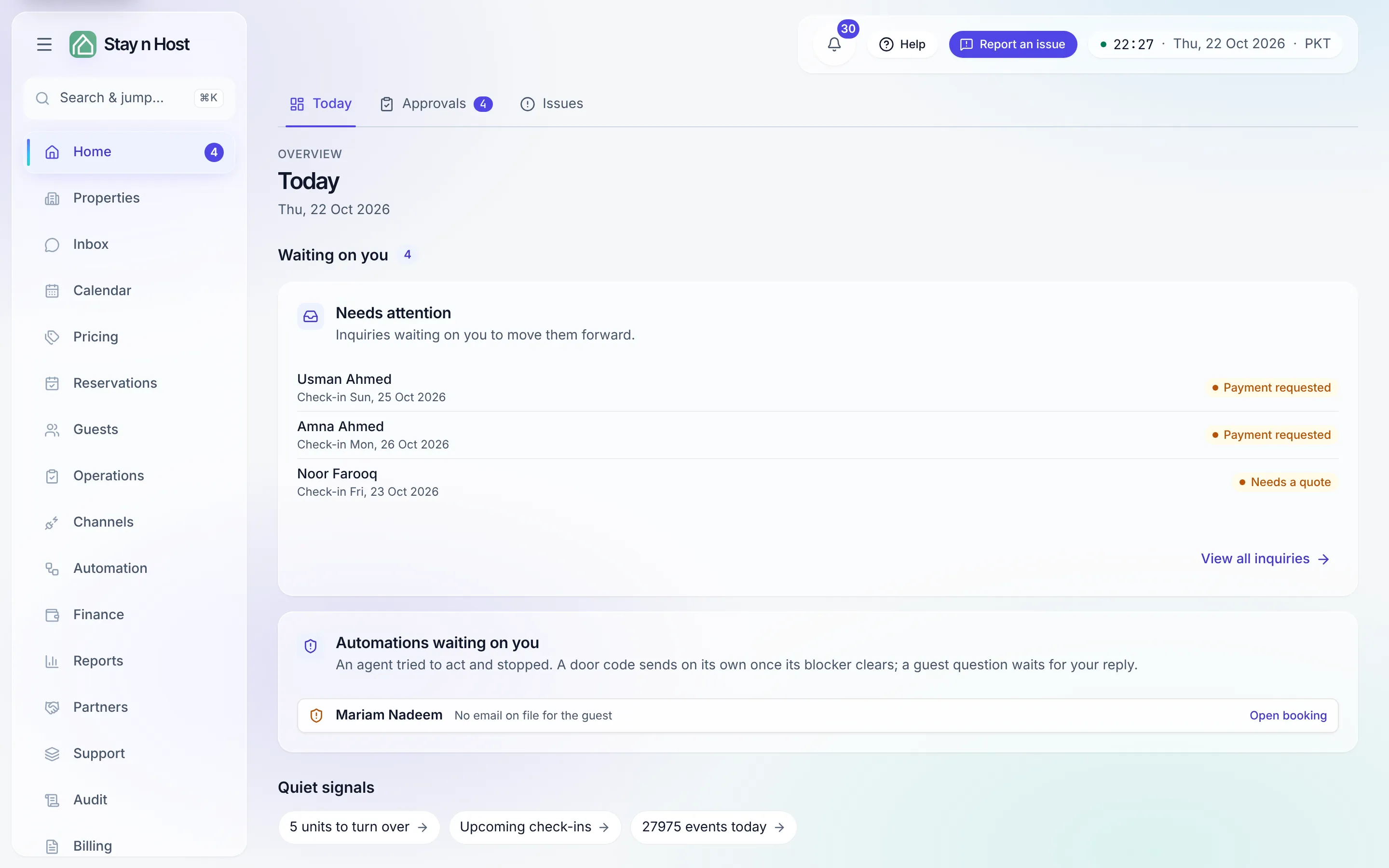
Home → Today (/today) is a queue, not a wall of
numbers:
- Waiting on you - the work only you can move, counted at the top: inquiries that need a quote or a payment check, door codes ready to relay, automations that stopped, and extras guests asked for.
- Today’s movements - every arrival and departure due today, with one-tap check-in and check-out, a checklist to check several arrivals in at once, and any overdue check-ins or check-outs.
- Quiet signals - short counts that describe the day (units to turn over, cleans missing photos, upcoming check-ins), each opening the page behind it.
While your workspace is new, Today also shows a setup checklist that walks you through the same steps as this guide - add a property, add a unit, set a rate, add photos and bank details - with optional polish beneath. Feature status shows everything else, and whether it is on. The day’s headline figures (active inquiries, check-ins, in-house guests, outstanding balance) live on the Daily Report.
Three ideas the whole app is built on
Section titled “Three ideas the whole app is built on”- Everything is a record with a history. Every booking, payment, and door code keeps an audit trail of who did what, when. You can always answer “why did this happen?”
- Money moves only when a person says so. Payments are verified by a person, and actions you choose can wait for an approval step first - see The approval system.
- Guests never need an account. Quotes, ID upload, and payment proof all happen on secure one-off links you share in chat.
What’s next
Section titled “What’s next”Ready to set up? Continue to Create your workspace - or jump straight to the area you need with Ctrl+K. Every integration is listed on Integrations.