
Read the master calendar
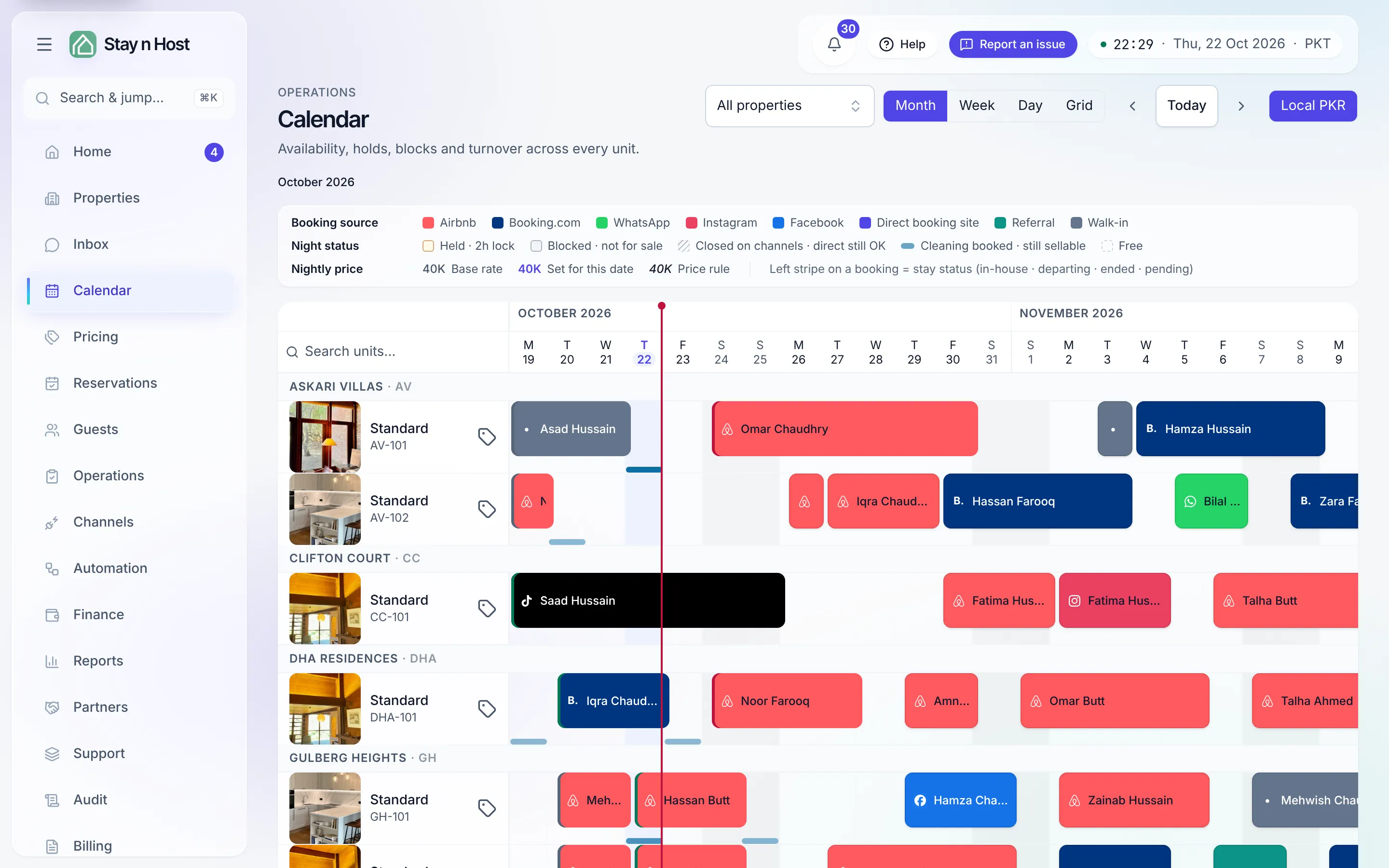
The Calendar is one horizontally-scrolling timeline of the whole portfolio: units down the left, grouped under their properties with a thumbnail; nights across the top. Every night of every unit is decided here - bookings from every channel, holds, blocks, and prep all land on the same grid.
The controls
Section titled “The controls”Across the top: a Property filter, the month / week / day / grid view switcher, the ‹ Today › stepper, and the price-source chips (Local with your currency, plus one chip per channel price lane) that choose which prices the rate cells show. The unit column header carries a search box that narrows rows by code, type, or property. Day view expands one day into 24 hours, with bars running from each stay’s check-in time to its checkout time. The URL carries your position, so any view is a shareable deep link.
Reading a unit’s row
Section titled “Reading a unit’s row”Each unit row is two lanes, so an ops annotation never hides a stay:
- Top lane - bookings and holds. A booking bar is filled in its source brand color (Airbnb, WhatsApp, walk-in, …) with the guest label and a source badge; a thin left stripe adds the stay status - in-house, departing, ended, pending. A hold is an amber striped bar with a live countdown (what holds are).
- Bottom lane - blocks and prep. Blocks are slate bars with an icon per reason; the dotted teal underlay after each checkout is the prep buffer, derived automatically.
The on-screen legend names every treatment, including two easy to confuse:
- Blocked · not for sale - the night is withdrawn everywhere.
- Closed on channels · direct still OK - a hatched rate cell; the OTAs cannot sell the night, but you still can.
A red vertical line marks now, at your workspace’s local time. Hovering any bar shows a detail card - guest, dates, money, or the block’s reason and note - and clicking a booking opens its booking record. Rate cells show each night’s price: muted for the base rate, accented when someone set that date, and in italics when a price rule moved it (the price card names the rule). The legend shows all three under Nightly price: Base rate, Set for this date, Price rule.
Moving with the keyboard
Section titled “Moving with the keyboard”The grid is one tab stop, not thousands. Tab into it and you land on today on the first row (or the night you were on last); then:
| Key | Does |
|---|---|
| Arrow keys | Move a night left or right, or a unit up or down. |
| Home / End | Jump to the first or last night in view. |
| Enter (or Space) | Select a night; a second Enter on another night selects the range and opens the selection panel. |
| F2 | Edit that night’s price in place. |
Focusing a night shows the same price card hovering does. A seat that cannot change the calendar can still move through it and read each night and price.
Prices from the grid
Section titled “Prices from the grid”- One night: press F2 on a night, or Edit price on its price card, and type the new price. See Edit a nightly price on the calendar.
- A range or a percentage: select the nights and use the Nightly price section of the selection panel.
- The unit’s base rate: the tag button at the end of each unit’s name, Set the base rate for {unit}, opens the same pricing dialog as the listing page, without leaving the calendar. It shows for seats that manage listings, on screens wider than a phone.
Moving things
Section titled “Moving things”Seats with booking-edit permission can drag a booking - sideways to new dates, up or down to another unit. Dropping it asks you to confirm the move and give a Reason for this move, which is recorded on the booking history beside the dates that moved. The server re-checks availability; a conflicting target is refused and nothing changes. Holds are never draggable - they belong to the funnel.